Device Code Phishing: The Microsoft 365 Attack That Walks Past MFA
Bottom line up front
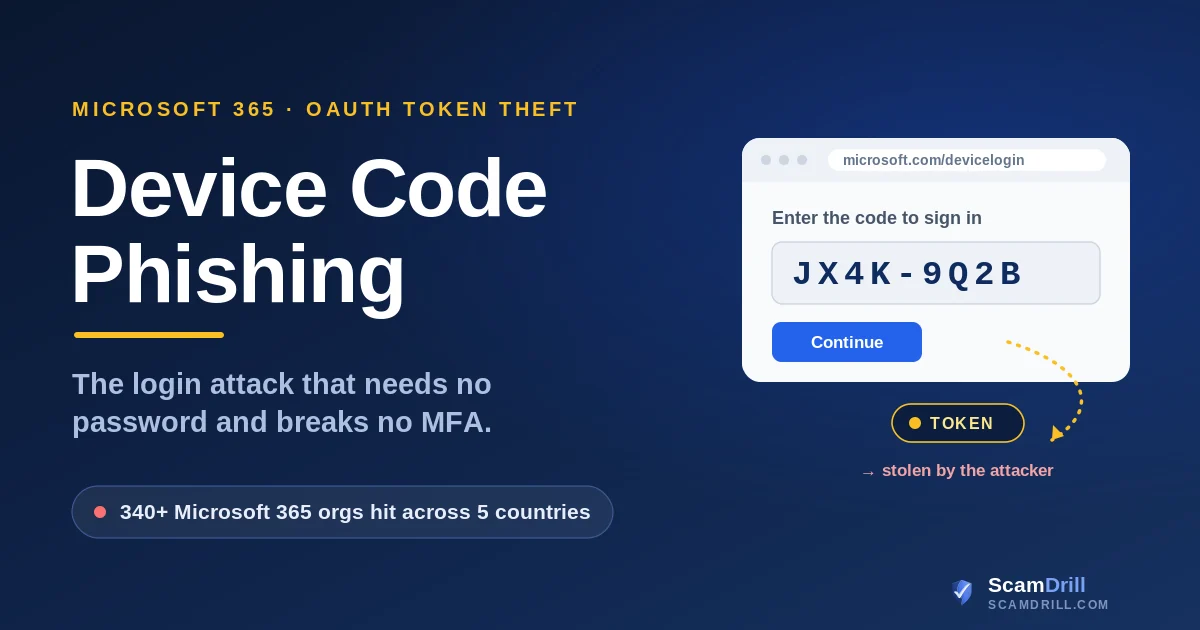
Device code phishing is the rare account takeover that needs no password and breaks no multi-factor authentication. Your employee does the signing in, on the real Microsoft page, after an attacker hands them a short code. When they enter it, they authorize the attacker's device instead of their own, and the company's email, Teams, and files open up with no second prompt. The fix is not a stronger password or more MFA. It is switching off the login flow that makes the trick possible, and teaching one reflex: a code you didn't ask for is not a login.
The email looks like a document share, a Teams invite, or a note from a vendor you actually do business with. It reads cleanly, because a machine wrote it for this exact recipient. Your employee clicks, lands on a page that says “to verify your identity, enter this code at microsoft.com/devicelogin,” and does as it asks. The page they end up on is genuinely Microsoft’s. The sign-in is real. The MFA prompt is real. Everything works the way it is supposed to, which turns out to be the entire problem.
A few minutes later, someone in another country is reading that mailbox. No password was stolen. No one-time code was intercepted. The FBI put out a public warning about this in a May 2026 alert, after a subscription kit called Kali365 turned the technique into something a low-skill buyer could rent and run. The same method, in more careful hands, has been used by a Russia-aligned espionage group since 2024. It is one of the cleaner ways into a Microsoft 365 tenant right now, and most of the defenses companies have invested in do not see it coming.
Five signs a “verify your identity” request is really an attack
Whether you are an employee or the person who runs the tenant, the tells are the same. If a sign-in request does any of the following, stop and treat it as hostile:
- You’re asked to enter a code you didn’t request. A real device-code login starts on a device you are holding, like a conference-room display or a printer. If a code arrives by email or chat, you didn’t start it, so someone else did.
- The code came in an email, attachment, or chat link. Microsoft does not email you a code to paste into a login page. The delivery method is the giveaway.
- The page is rushing you. A visible countdown, a “this expires in 15 minutes,” or a code that has already been copied to your clipboard are all pressure, not service.
- The sender is plausible but the ask is odd. A vendor, an invoice, an RFP, a shared file, anything that ends in “sign in to view” and routes you through a Microsoft login you didn’t expect.
- After you sign in, nothing opens. You “verified,” and the promised document never appears, because the only thing that needed your login was the attacker’s waiting session.
Any one of these is enough to walk away. In a real lure you will usually see several at once.
Definition
Device code phishing: an attack that abuses Microsoft’s legitimate device-code login flow, the one built for TVs and printers, by getting a target to enter an attacker-generated code on the real Microsoft sign-in page. The victim completes the login and MFA and unknowingly hands the attacker valid access and refresh tokens.
Why this matters: almost every phishing defense an organization buys is built to catch a stolen password or a fake login page. Device code phishing trips none of those wires. There is no spoofed site to block, no password to leak, and no MFA prompt to fail, because the employee authenticates on the genuine Microsoft page and the token that comes out the other side is routed to the attacker. Microsoft has been direct about this in its own writeups: the technique does not reflect a flaw in its code. It abuses a standard that is working exactly as designed.
How the attack actually works
Once you see the sequence laid out, the strangeness of it makes sense: the victim is a participant, not a bystander. The FBI describes the chain in four moves, and Microsoft’s threat researchers fill in the mechanics. Here is the combined picture.

Source: ScamDrill analysis of FBI IC3 alert I-052126-PSA and Microsoft Threat Intelligence research, 2025–2026.
The lure is the part that has changed most. When operators write their own emails, quality varies. When a kit writes them, the copy is generated for the recipient’s role: invoices for the finance team, RFPs for sales, workflow notices for the people on a manufacturing line. Microsoft’s researchers documented exactly that kind of role-aware, AI-generated targeting in an April 2026 campaign. We have written before about how convincing machine-written lures have gotten, in our look at AI-driven neo-phishing; this is that same trend pointed at your login screen.
Why your MFA didn’t catch it
This is the part that catches security teams off guard, because it contradicts the thing everyone has been told. Multi-factor authentication is the backstop: even if a password leaks, the attacker still cannot produce the second factor. Device code phishing sidesteps that logic completely, because the legitimate user supplies the second factor. They get the push and approve it. They type the one-time code. All of it real, all of it on Microsoft’s own page. MFA did its job. It confirmed the right person was at the keyboard. It simply had no way to know that the session being authorized belonged to someone else’s device.
Source: ScamDrill, based on Microsoft Threat Intelligence guidance on device code phishing, 2025–2026.
So “we have MFA, we’re covered” is the dangerous assumption here. A push notification, an authenticator code, or a text message proves who is signing in. None of them binds that approval to the device that started the request, and that gap is the whole attack. The same blind spot powers adversary-in-the-middle phishing, which relays a real login through a look-alike page and steals the session cookie outright. It is the same reason we keep pushing organizations toward phishing-resistant methods and hardware-backed sign-in in our work on social engineering against smaller businesses: the goal is to stop trusting that a successful login means a trustworthy session.
The kits behind it: Kali365 and EvilTokens
What turned a careful, hands-on technique into an everyday risk is commoditization. When Microsoft first documented device code phishing at scale, in February 2025, the operator was Storm-2372, a group it assesses with moderate confidence aligns with Russian interests, active since August 2024 and going after governments, NGOs, defense, telecom, healthcare, and energy across several regions. Their lures imitated WhatsApp, Signal, and Teams, and the operators built rapport first, posing as someone the target would expect to hear from, before sending the device-code invite. That is patient, expensive work.
A year later, you can rent it for the price of a team lunch. The FBI’s May 2026 alert named Kali365, a phishing-as-a-service platform sold mainly through Telegram for as little as $250 for a 30-day subscription. For that, a buyer with almost no technical skill gets AI-generated lures, ready-made campaign templates, a live dashboard tracking who has been hit, and automated OAuth token capture. The FBI listed the campaign’s targets as manufacturing, education, insurance, financial services, healthcare, and government, which is another way of saying everyone. A parallel kit, EvilTokens, has been sold the same way since mid-February 2026 and bundles a built-in webmail interface and reconnaissance tools aimed squarely at business email compromise.
The 15-minute window stopped being a defense
The kits also fixed the one real weakness in the older version of this attack. A device code is valid for only 15 minutes. Early campaigns baked a pre-generated code into the email, so a slow target meant a dead code and a failed attempt: open the message 20 minutes late and the attack just expired on its own. The newer tooling solved that by generating the code the moment the victim lands on the page, copying it straight to their clipboard, and polling Microsoft every few seconds to catch the token the instant the login goes through. The countdown that used to protect targets now starts only when the victim is already at the keyboard.
What happens after they’re in
Getting a token is the beginning, not the payoff. Microsoft watched operators register a new device within ten minutes of a breach to lock in durable access, then go quiet for hours before doing anything noisy. The quiet work is the dangerous part: malicious inbox rules that hide or forward replies, Microsoft Graph queries that map who reports to whom and who can move money, and keyword searches through the mailbox for words like “password,” “wire,” “invoice,” and “credentials.” In the 2025 Storm-2372 cases, operators even pivoted the stolen token into a registered device and a Primary Refresh Token, the credential that keeps an attacker inside long after the original session should have ended.
Where it usually goes from there is business email compromise. Once an attacker is reading a finance lead’s real mail, they don’t need malware, they need a plausible moment to redirect a payment. BEC remains one of the most expensive categories of cybercrime in the country: the FBI’s Internet Crime Complaint Center logged $2.77 billion in BEC losses in 2024 alone, and nearly $8.5 billion across the prior three years. A stolen token is often the first domino, which is why the same crews that run device code phishing also feed the wire-fraud and invoice-fraud schemes we cover in the business email and video compromise explainer and the NACHA fraud-monitoring rule.
How to shut it down
The good news is that this attack has a hard off-switch most tenants have never flipped. Device code flow is a niche feature, built for input-constrained devices like smart TVs and printers, and the majority of organizations do not need it for daily work. Microsoft’s own guidance is to block it wherever possible. The controls below are ordered roughly by impact.
Sources: FBI IC3 alert I-052126-PSA; Microsoft Entra Conditional Access guidance, 2026.
Block device code flow in Conditional Access. In Microsoft Entra, a Conditional Access policy can switch the device-code authentication flow off for everyone, with narrow exceptions. Audit where it is legitimately used first so you don’t break a real workflow, then block the rest. Exclude your break-glass emergency accounts from the policy so a misconfiguration can never lock you out of your own tenant. This single setting is the closest thing to an off-switch the attack has.
Move to phishing-resistant MFA. Passkeys and FIDO2 security keys raise the floor on nearly every other credential attack, and they are the direction Microsoft points defenders. One honest caveat: against device code phishing specifically, the decisive control is blocking the flow, because the user still completes a real sign-in. Phishing-resistant methods shut down the broader adversary-in-the-middle and credential-theft playbook the same crews run, so adopt them as a layer, not as the answer to this one attack.
Close the pivot. Restrict who can register devices in Entra and block authentication-transfer policies, so a stolen token cannot be upgraded into a registered device and a Primary Refresh Token. That is the step that turns a bad afternoon into a months-long intrusion, and it is preventable.
Watch the tells, and respond like the clock is running. Risky sign-in policies, alerts on new device registrations, and routine reviews of newly created inbox rules catch the post-compromise activity even when the login itself looked clean. And if you do suspect a compromise, revoking sessions is not enough on its own. Microsoft notes that standard revocation kills refresh tokens but can leave existing access tokens valid for up to an hour, which a hands-on attacker will spend. Disable the account to contain it, then revoke, then hunt for the new device and the inbox rules.
The human moment that ends it
Every control above is worth doing, and not one of them will be fully in place in every tenant on the morning the email arrives. The last line of defense is a person: the employee looking at a code and a “verify your identity” button, deciding whether to follow the instructions. That decision is trainable, and the rule is short enough to survive a busy inbox: a code you didn’t ask for is not a login, it’s an attack. Microsoft’s real sign-in page even names the app you are about to authorize. A two-second pause to read it is often the entire defense.
This is where rehearsal beats a memo. An employee who has already seen a device-code lure once, in a safe drill, and clicked the wrong thing with no real consequence, recognizes the live one. A warning slide watched in a calm quarterly training tends to evaporate the moment a believable email lands during a deadline. A reflex, built by doing, does not. It is the same logic behind running a 30-day phishing simulation rather than relying on a one-time briefing, and it is why we built ScamDrill for organizations as well as families.
Your last line of defense is the person staring at the code.
ScamDrill runs realistic phishing and account-takeover drills, including device-code and OAuth lures, so your team builds the reflex before a real one lands in the inbox. Setup takes minutes.
Start free →If you think an account was already hit
Move fast and assume the stolen token is already working. Disable the affected account rather than just resetting the password, because a reset does nothing to a token that has already been issued. Revoke the account’s sign-in sessions, then look for what the attacker left behind: a device you do not recognize registered in Entra, inbox rules nobody created, mail forwarding you never set up. Pull the thread on anything financial the account could reach, especially pending invoices and wire instructions.
Then treat it as an incident, not a one-off cleanup, because token theft is rarely a single account by the time you notice it. Our business scam incident response guide walks through the first hour, and the broader pattern of OAuth and token abuse, including a real-world case, is the subject of our writeup on the ShinyHunters OAuth breach. If an employee is staring at a suspicious message right now and isn’t sure, our free email scam checker gives a quick read on the tells before anyone clicks anything.
None of this requires a bigger security budget. It requires turning off a setting most companies never needed, hardening the way people sign in, and making sure the person at the keyboard has seen the trick before. Do those three things and device code phishing stops being the quiet way in.