AiTM Phishing: The Stolen Session Cookie That Walks Past Your MFA
Bottom line up front
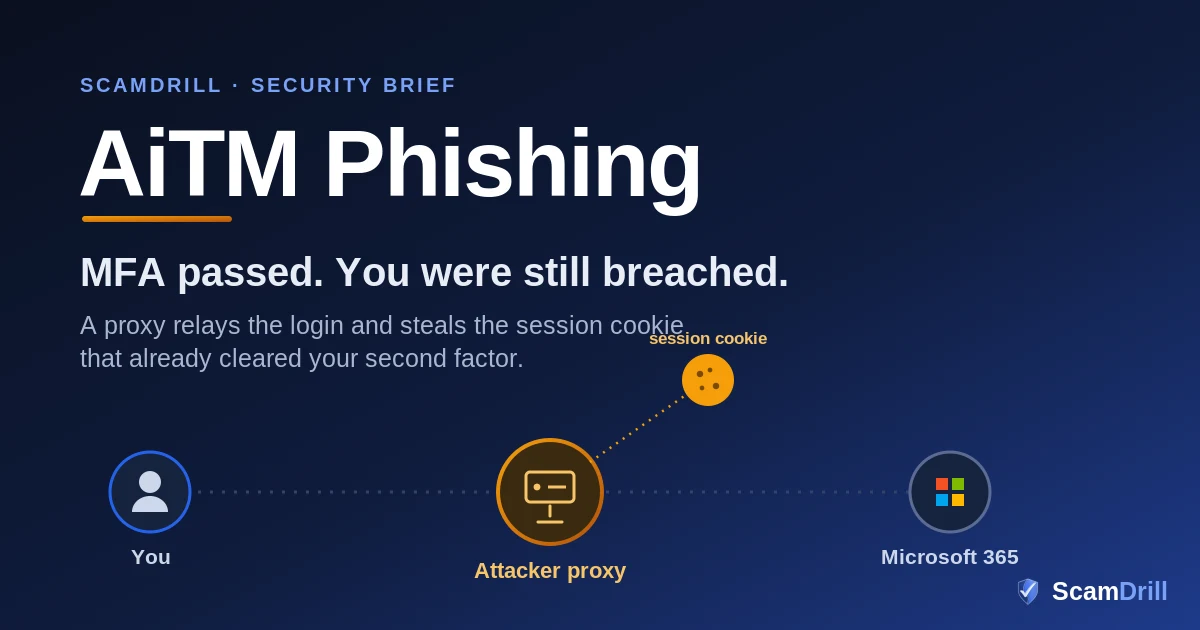
Adversary-in-the-middle (AiTM) phishing is the account takeover that lets your multi-factor authentication pass and still hands the attacker the keys. A proxy server sits between your employee and the real login page, relays the password and the MFA approval to the genuine site, and copies the session cookie that comes back. That cookie is a session that has already cleared MFA, so replaying it prompts nothing. Ordinary MFA — codes and push approvals — can all be relayed. The fix that actually closes the gap is phishing-resistant sign-in: passkeys and FIDO2 keys, backed by Conditional Access and a workforce that has seen the trick before.
Your finance lead gets an email about a shared document. It is themed like DocuSign, or a SharePoint invite, or a OneDrive file from a name they recognize. They click, land on a Microsoft sign-in page that looks exactly right, type their password, and approve the push on their phone. The file opens, or seems to. Nothing feels wrong. Meanwhile, on a server the employee never saw, that whole sign-in was being relayed keystroke by keystroke to the real Microsoft login, and the cookie Microsoft handed back — the little token that says “this browser is signed in” — was copied out the side. A few minutes later, someone in another country loads that cookie into their own browser and is reading the mailbox. No password to crack. No MFA prompt to fail.
This is adversary-in-the-middle phishing, and it is the technique quietly doing most of the damage to Microsoft 365 tenants right now. Security teams spent years being told that turning on MFA closes the door. AiTM is the crowbar that gets around the door without touching the lock, and in 2026 you can rent the crowbar for the price of a modest software subscription.
Six tells that a “login” page is really an AiTM proxy
Whether you are the person clicking or the person who runs the tenant, the warning signs are the same. If a sign-in moment does any of the following, stop and treat it as hostile:
- The link took you to sign in, and you didn’t start there. You clicked a document, an invoice, or a “view file” button, and the next thing you saw was a login. Legitimate shares from a service you’re already signed into rarely ask you to authenticate again from scratch.
- The web address is close but not exact. AiTM kits run on look-alike domains — a hyphen, an extra word, an odd top-level domain like .ru or .in.net. The page can be a pixel-perfect mirror of Microsoft’s, because it literally is proxying the real one. The URL bar is the part it can’t fake.
- You had to clear a CAPTCHA or a “verify you’re human” gate before the login. Attackers add these to keep automated scanners out so the phishing page survives longer. A human check in front of a Microsoft login you reached from an email is a bad sign, not a reassuring one.
- MFA fired at an odd moment. You got a push or a code for a sign-in you didn’t consciously begin, or for an app you weren’t opening. That prompt is the attacker’s session asking you to approve it.
- The lure leaned on a trusted brand and a small urgency. A shared contract, a voicemail notification, a “your file will be deleted” nudge. The brand is there to lower your guard; the deadline is there to stop you checking the address bar.
- Nothing really opened after you signed in. You “logged in,” and the promised document never appeared, or you were bounced to a generic page. The only thing that needed your login was the attacker’s waiting session.
Any single one of these is enough to stop and verify through a channel you trust. In a real campaign you will usually see several stacked together.
Definition
Adversary-in-the-middle (AiTM) phishing: an attack that plants a proxy server between the victim and the real login page. The victim types their password and approves MFA on what looks like the genuine site; the proxy relays it all to the real service and copies the session cookie handed back, letting the attacker resume an already-authenticated session without the password or a fresh prompt.
Why this matters: nearly every phishing defense an organization has bought assumes the attacker is after a password, or is standing up a fake login to harvest one, or will be stopped cold at the MFA step. AiTM trips none of those wires the way they were designed to trip. The employee authenticates on a page that is relaying the genuine Microsoft site, the second factor is satisfied for real, and what the attacker walks away with is not a credential but a live session. Microsoft, CISA, and NIST have all landed on the same conclusion about where this leaves the standard MFA most companies deployed: it’s necessary, and it is no longer sufficient on its own.
How the attack actually works
The strange part of AiTM is that the victim isn’t fooled into typing a password onto a static fake form and moving on — that is the older, cheaper build, and it is still everywhere, most recently in the patient-portal campaigns Epic documented this summer. The fake page here is alive. It’s a reverse proxy — the open-source tool Evilginx is the best-known example — and it forwards each request to the real Microsoft login and passes the real responses back, so the victim is having a genuine conversation with Microsoft through a middleman who is transcribing everything. Here is the sequence.

Source: ScamDrill analysis of Microsoft Threat Intelligence and Lexfo/Rescana research on Evilginx-based AiTM campaigns, 2026.
The delivery keeps changing shape, which is part of why filters struggle to keep pace. Microsoft’s researchers watched attackers rotate between PDF attachments, Office documents, and QR codes from month to month through the first half of 2026, and lean on CAPTCHA gates to keep automated scanners from ever reaching the phishing page. The lures themselves have gotten sharper too, because a machine can write one tuned to the recipient’s role. We wrote about that shift in our look at AI-driven neo-phishing; AiTM is where that polished lure gets pointed at your login screen.
Why your MFA didn’t catch it
This is the part that catches good security teams flat-footed, because it contradicts the thing everyone was told. Multi-factor authentication was the backstop: even if a password leaks, the attacker can’t produce the second factor. AiTM doesn’t argue with that logic, it sidesteps it. The victim produces the second factor, for real, and the attacker isn’t trying to reuse it. What the attacker takes is the thing issued after the second factor succeeds: the session cookie that tells the browser it’s signed in. Replaying a cookie for a session that already cleared MFA doesn’t re-trigger MFA. That’s the entire trick.
Source: ScamDrill, based on CISA and NIST phishing-resistant MFA guidance and Microsoft Entra ID authentication-strength documentation, 2026.
So “we have MFA, we’re covered” is the assumption that gets tenants breached here. A text code, an authenticator code, or a push approval proves who is signing in at that moment. None of them binds that approval to a browser or a device the attacker can’t clone, and that gap is the opening. It’s the same reason we keep pushing smaller organizations toward hardware-backed, phishing-resistant sign-in in our work on social engineering against SMBs: the goal is to stop treating a successful login as proof of a trustworthy session.
The kits turned it into a commodity
What moved AiTM from a skilled operation to an everyday risk is the same thing that commoditized ransomware: subscriptions. Phishing-as-a-service platforms now sell the whole pipeline — the reverse-proxy infrastructure, the look-alike templates, the anti-bot gates, a live feed of captured sessions — to buyers with almost no technical skill. Microsoft named Tycoon2FA as one of the dominant kits and, notably, ran a Digital Crimes Unit disruption against it in March 2026. That operation worked: Microsoft reported Tycoon2FA-linked phishing volume fell roughly 92% by the end of the second quarter. The uncomfortable footnote is that no single successor rose to replace it at the same scale, which usually means the demand fragmented across smaller kits rather than disappearing.
You could see the fragmentation up close in mid-July. On July 13, 2026, researchers at Lexfo found a misconfigured server that had left an active phishing operation’s entire toolkit exposed to the open internet, and Rescana and GBHackers wrote it up. Inside were three separate Evilginx-based campaigns targeting Microsoft 365, run by different operators using custom forks of the open-source proxy. The lures imitated OneDrive, Adobe, DocuSign, SharePoint, and Microsoft Authenticator. One campaign had been running for more than a year; another had confirmed victims across at least a dozen countries. And a small detail in the writeup tells you how patient these crews are: one operator’s stolen session cookies were configured to stay valid for a full year.
The stolen cookie doesn’t expire on your schedule
That year-long cookie lifetime points at the quiet danger of session theft: containment is not automatic. With a stolen password, forcing a reset ends the problem. A stolen session cookie is a different animal. It represents an authentication that already happened, and depending on how the tenant is configured, it can keep working long after the victim has changed their password and gone home. The exposed toolkit also included automated token-refresh tooling, meaning the attackers were engineered to keep a foothold alive rather than smash and grab. If you assume a reset fixed it, you may be leaving a door propped open for weeks.
The lure in front of the proxy is increasingly a genuine notification. In one August campaign, a real Frame.io share hid the link to the relay page inside a PDF; here is how that version works.
What happens after they’re in
Loading the cookie is the start, not the payoff. Once an attacker is reading a real mailbox, the moves are familiar to anyone who has cleaned up a business email compromise. They set inbox rules to hide or auto-forward specific replies, so the victim never sees the thread the attacker is hijacking. They search the mailbox for words like “wire,” “invoice,” “ACH,” and “bank details.” In the campaigns Lexfo exposed, operators went further and dropped remote-management tools onto machines to keep access even if the session was cut. The endgame is usually money: a payment redirected, a vendor invoice quietly edited, a payroll change slipped in from an account everyone trusts.
That’s the through-line connecting AiTM to the fraud we cover elsewhere. A hijacked mailbox is the on-ramp to the invoice and wire schemes in our vendor email compromise guide, and it’s a close cousin of the token-theft attack in our writeup on device code phishing, which reaches the same destination by a different road. The FBI’s Internet Crime Complaint Center has logged billions in business email compromise losses year after year, and a stolen session is frequently the first domino. Once you’re looking at a real compromise, the clock matters, which is why we walk through the opening moves in the business scam incident response guide.
The lure in front of the proxy keeps changing. One of 2026’s fastest-growing is a fake request for quotation sent to sales and procurement staff; here’s how the RFQ version works.
How to shut it down
The good news is that AiTM has a real counter, and it isn’t exotic. The controls below are ordered roughly by how much they move the needle.
1. Move to phishing-resistant MFA
This is the one that actually closes the gap. CISA, NIST, and Microsoft all draw the same line: phishing-resistant methods — FIDO2 security keys, passkeys, and Windows Hello for Business — are in a different class from codes and push approvals. The reason is cryptographic, not procedural: a passkey or security key is bound to the exact domain it was registered for. When the victim lands on an attacker’s look-alike proxy, the key simply refuses to sign in, because the domain doesn’t match. There is no code to relay because no code is ever produced. Rolling this out to your whole workforce takes planning, so start with the accounts that would hurt most if hijacked: finance, executives, IT admins, anyone who can move money or change permissions.
2. Tie the session to a device the attacker doesn’t have
Phishing-resistant sign-in raises the floor; Conditional Access adds a second wall. A policy that requires a compliant or managed device means that even a stolen cookie is useless from the attacker’s unmanaged laptop, because the session is bound to hardware your organization enrolled. Microsoft’s newer token protection and continuous access evaluation features push this further, letting a service notice that a token is being replayed from a context it was never issued to and cut it off mid-session rather than waiting an hour for it to expire.
3. Watch for the tells and respond fast
No control is perfect on day one, so instrument for the aftermath. Alert on impossible-travel and anomalous sign-ins, on newly created inbox rules and mail-forwarding, and on new device or OAuth-app registrations. And rehearse the response, because the reflex for a stolen cookie is not the reflex for a stolen password: you revoke sessions and disable the account first, then reset credentials, because resetting a password alone can leave a live session untouched.
The 60-second gut check for staff
If a link sends you to log in when you didn’t expect to, stop and look at the address bar, not the page. The page can be a perfect copy of Microsoft’s. The domain can’t be. When in doubt, close the tab and reach the service by typing the address yourself or using a saved bookmark. A password manager helps here for a quiet reason: it won’t autofill your Microsoft credentials on a look-alike domain, so a field that stubbornly won’t autofill is a warning worth heeding.
The human moment that ends it
Every control above is worth doing, and not one of them will be fully rolled out in every tenant on the morning the email lands. Passkey deployments take months. Conditional Access has exceptions. The last line is a person looking at a login they didn’t expect, deciding whether to type their password. That decision is trainable, and the rule is short enough to survive a busy inbox: a link that sends you to sign in is a moment to check the address bar, every time.
This is where rehearsal beats a memo. Someone who has already met an AiTM lure once, in a safe drill, and clicked the wrong thing with no real consequence, tends to catch the live one. A warning slide watched in a calm quarterly training evaporates the moment a believable “shared contract” arrives during a deadline. A reflex built by doing does not. It’s the same logic behind running a 30-day phishing simulation instead of relying on a one-time briefing, and it’s why we built ScamDrill for organizations as well as families.
Your last line of defense is the person staring at the login.
ScamDrill runs realistic phishing and account-takeover drills, including adversary-in-the-middle and look-alike login lures, so your team builds the reflex before a real one lands. Setup takes minutes.
Start free →If you think a session was already hijacked
Move fast and assume the stolen cookie is live. Revoke the account’s sign-in sessions and disable the account in Microsoft Entra rather than only resetting the password, because a reset does nothing to a session that has already been issued. Then look for what the attacker set up while inside: inbox rules nobody created, mail forwarding you never configured, a device or app registration you don’t recognize, OAuth grants added during the window. Pull the thread on anything financial the mailbox could reach, especially pending invoices and any request to change payment details.
A reset also leaves behind anything the attacker added once inside: their own device, their own authenticator, inbox rules. We walk through the order that actually evicts them.
Treat it as an incident, not a one-off cleanup, because by the time you notice, session theft is rarely confined to one account. Our business scam incident response guide walks through the first hour, and the broader pattern of OAuth and token abuse, with a real-world case, is the subject of our writeup on the ShinyHunters OAuth breach. If an employee is staring at a suspicious message right now and isn’t sure, our free email scam checker gives a quick read on the tells before anyone clicks.
None of this needs a bigger security budget. It needs a shift in what you trust: away from “the login succeeded” and toward “the credential is bound to our domain, the session is bound to our device, and the person at the keyboard has seen the trick before.” Do those three things and the stolen cookie stops being a way in.