When the Help Desk Calls You: The 2026 Vishing Playbook for Small Businesses
Bottom line up front
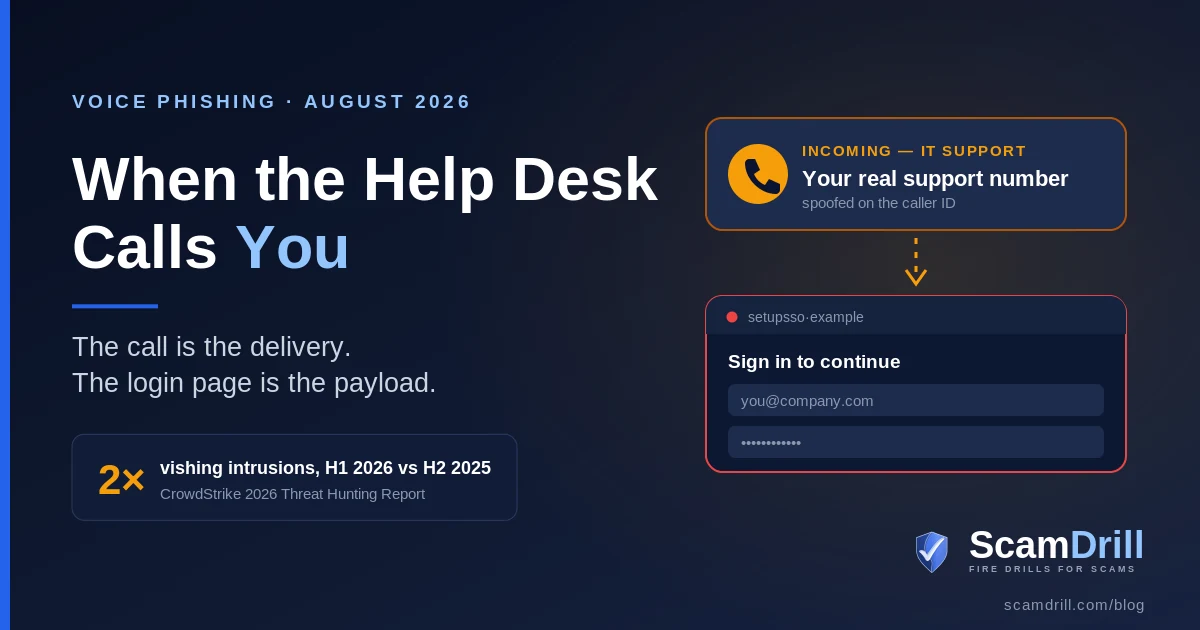
Voice-phishing intrusions in the first half of 2026 ran at twice the rate of the back half of 2025, and the shape of the call changed. Crews no longer only phone your help desk pretending to be an employee — they phone your employees, on personal mobiles, pretending to be the help desk, with your real support number on the caller ID. The call is only the delivery. The payload is a login page that harvests the password and the MFA code in real time. If you are a 30-person company with no help desk to check against, the defense is procedural and costs nothing: no credential, code, or MFA change ever happens on an inbound call.
A caller ID showed a New York landline. The voice said there was an internal incident ticket that needed reviewing and closing. The employee went and looked — and could not find any such ticket in the system. So they did the reasonable thing and offered to route the caller to the official service desk.
The caller refused. Said he had been routed to this employee specifically. Then he offered an alternate way to get to the ticket.
That alternate way was a fraudulent Okta login page, and the only reason it did not work is that a security control blocked the destination before anything was typed. The employee said he would gather more information first. The caller hung up and never called back. Bridewell wrote the whole thing up, and it is worth reading because nothing about it is exotic. No malware. No zero-day. A phone call and a link.
Seven things a real IT call never does
Give these to your team before you give them anything else. They work at any company size and they do not require anyone to understand what an adversary-in-the-middle proxy is.
- Calls your personal cell about a work account. Google's threat researchers specifically flagged that this crew “often contacts employees via their personal mobile devices.” Your IT provider has your work number. A stranger who has your personal one went looking for it.
- Refuses a callback. The single most useful sentence your staff can own is “let me call you back on our number.” A real technician says fine. An attacker starts negotiating.
- Arrives before the ticket exists. If IT is calling about a ticket, you should be able to find that ticket yourself, in your own system, without the caller's help.
- Sends you to a sign-in page. Ever. Legitimate support does not need you to authenticate on a link they supply. This is the whole point of the call.
- Asks you to read back a code. Any code, from any app, for any reason. There is no legitimate version of this request.
- Wants you to remove or re-enroll MFA “for the migration.” The migration story exists because it makes an MFA change sound routine. Ripping out the old method and adding a new one is the attack, not a step in it.
- Gets more urgent when you slow down. Real IT tolerates “I'll get back to you in ten minutes.” Pressure that escalates the instant you introduce a delay is the tell that survives every rewrite of the script.
Definition
Help desk vishing: a voice-phishing attack that borrows the credibility of IT support. The caller either impersonates an employee to talk a help desk into resetting a password or MFA, or impersonates the help desk to walk an employee onto a fake login page. Both end in an account takeover, and neither needs a software vulnerability.
What changed in the first week of August
Two things landed within four days of each other, and together they explain why this is worth your attention now rather than at the next quarterly review.
On August 3, CrowdStrike published its 2026 Threat Hunting Report. Buried in the front-line numbers: vishing intrusions in the first half of 2026 came in at 2x the second half of 2025. Two named crews, which CrowdStrike calls CORDIAL SPIDER and SNARKY SPIDER, used voice calls to compromise single sign-on accounts and pull data out of SaaS applications. In one case SNARKY SPIDER went from account takeover to data theft in under five minutes. The same report clocked monthly device code phishing attempts up 15x in six months, which is a different technique with the same destination — we covered that one separately in our guide to device code phishing on Microsoft 365.
Then, on August 5, Bloomberg reported that Citadel, Point72, and Two Sigma had been targeted in a coordinated wave of attempted attacks. Two Sigma said it blocked the attempt with no impact to its data or systems. Point72 told investors an initial review had found no client data stolen. Citadel declined to comment. Press coverage described the wave as AI-powered voice phishing; I would treat the AI framing as unconfirmed reporting rather than an established technical fact, because the vendor write-ups that followed describe help-desk impersonation and spoofed caller ID, not synthesized voices. The distinction matters less than people think, though. A convincing human reading a good script has never needed a voice cloner.
Two days later, Google Threat Intelligence Group and Mandiant published research on the group behind a related campaign, tracked as UNC6671. As summarized by The Hacker News, the crew “continues to rely on voice phishing to target enterprise employees, posing as IT help desk staff facilitating mandatory, urgent security migrations,” and often reaches employees on personal mobile devices. They spoof the legitimate help desk phone number. They register credential-harvesting domains built to sound like the thing they are impersonating — passkeyhelpdesk, setupsso, idokta. Once inside, they register their own MFA device and remove the existing one, then use the compromised mailbox to reset passwords on apps that sit outside single sign-on, deleting the reset confirmations and security alerts behind them.
Google's own assessment of an earlier phase of this activity is the line I would put on a slide: these compromises are not the result of a security vulnerability in vendor products or infrastructure. There is nothing to patch. The target was a conversation.
Two directions, one attack
Most coverage of this treats it as one thing. It is really two, and which one you are exposed to depends on how your company is shaped.
There is now a third transport worth knowing about, though the pretext is identical: the same crews have started opening the conversation in Microsoft Teams instead of picking up the phone, from a tenant they registered themselves. We wrote that one up separately — what changes when the help desk messages you instead of calling — and the callback rule below covers both, which is the argument for teaching the rule rather than the channel.

Sources: Google Threat Intelligence Group / Mandiant reporting on UNC6671 (August 2026); FBI and CISA joint advisory AA23-320A, Scattered Spider; CrowdStrike 2026 Threat Hunting Report. Compiled by ScamDrill, August 2026.
Direction A is the one the FBI and CISA documented in their joint advisory on Scattered Spider, first published in November 2023 and updated since. Attackers “use social engineering techniques to convince IT help desk personnel to reset passwords and/or MFA tokens,” then register their own MFA token to keep the access. The advisory also lists something small businesses should read twice: under the technique for trusted relationships, it notes that these actors abuse the trusted relationships of contracted IT help desks. That is a managed service provider. That is most small companies.
Direction B is what grew this year. It skips the help desk entirely, which is convenient for the attacker, because a well-run help desk is a control and a distracted employee at 4:40 on a Thursday is not.
The problem nobody writes up: you don’t have a help desk
Nearly every article about this attack is written for a company with a staffed service desk, a documented reset procedure, and an identity team that can tune it. If that describes you, the advice is straightforward: add step-up verification on identity actions, put a callback in the runbook, and audit it.
Most of the businesses I talk to do not have any of that. The “help desk” is one of four things: a person named Dave who also runs the warehouse, an MSP with a ticket portal nobody has logged into since onboarding, a shared IT inbox, or the owner. And that changes the threat in ways worth spelling out, because the standard advice quietly assumes a structure you do not have.
| The assumption | What it looks like at 12–80 people |
|---|---|
| “Train your help desk agents” | There is one person, and they are not a security specialist. They are also the one who fixes the printer, so the reset request feels like every other favor. |
| “Verify against HR records” | There is no HR system to verify against. Everyone knows everyone, which is exactly why an unfamiliar-but-plausible voice gets the benefit of the doubt. |
| “Call the employee back on their directory number” | There is no directory. Numbers live in individual phones and a spreadsheet from 2023. |
| “Check with the identity team” | Your identity team is your MSP, and the whole reason you called them is that something is broken and urgent. |
| “Staff will know the real support number” | Nobody knows the real support number. It is in a welcome email from whenever they joined. |
Read that column again and you will notice the pattern: none of the gaps are technical, and none of them cost money to close. They cost about an afternoon.
There is one more thing that makes small companies attractive here, and it is not weakness in the usual sense. It is the transition. An MSP changeover, a new payroll platform, a Microsoft 365 tenant migration, a first-time SSO rollout — every one of those makes “hi, this is the new IT team, we're migrating your account today” not just plausible but expected. Attackers do not need to guess when your windows open, either; job postings, LinkedIn announcements, and vendor press releases advertise them.
The script, line by line
Here is the shape of a Direction B call, assembled from the reported campaigns. I am writing it out because red-flag lists are easy to nod at and hard to recognize in the moment, and the moment is the whole problem.
The opener establishes a real-sounding artifact. A ticket number, a migration deadline, a security policy your company genuinely announced. In the Bridewell case it was an incident ticket that needed review. The artifact does three jobs at once: it explains why they are calling, it makes the call feel like a continuation of something, and it puts you in the position of resolving a task rather than evaluating a stranger.
The caller ID does the heavy lifting. Spoofing a number is trivial and has been for years. When the number on your screen matches the number on your intranet, most people stop evaluating. Worth saying plainly to staff: caller ID is a suggestion, not an identity.
They call your personal phone, and treat that as normal. This is the newest wrinkle and the one I would train hardest on. It sounds more legitimate to some people, not less — “they had my cell, so they must be internal” — when the correct read is the opposite. Your IT provider calls your work number because that is the number in the system they administer.
The pretext is a migration, not a problem. Older scripts led with something broken. Current ones lead with something mandatory. A migration is better tradecraft: it is forward-looking, so there is nothing for you to check against; it is company-wide, so you feel singled out for scheduling rather than for suspicion; and it makes an MFA change sound like the point rather than the crime.
The link is the pivot. Everything before this is theater. The page it opens is a proxy sitting between you and the real sign-in service, relaying your keystrokes to the real login in real time and passing the real prompt back to you, which is why the MFA code you type works — and then why the session cookie ends up in someone else's browser. If that mechanism is unfamiliar, we walk through it in detail in our piece on adversary-in-the-middle phishing. The short version: the page looks right because it is right, forwarded.
They stay on the line. This is the part people underestimate. A phishing email is asynchronous and gives you a gap to think in. A call closes that gap, because the attacker adjusts in real time — to your hesitation, to your questions, to the error message on your screen. Verizon's 2026 Data Breach Investigations Report put pretexting at 6% of investigated incidents as an initial vector, and its synchronous nature is precisely why it is harder to train against than a static email.
The tell that survives every rewrite
Attackers rewrite pretexts constantly. What they cannot change is the structure: an inbound contact, creating time pressure, asking you to authenticate or approve something. Teach that shape rather than this month's story. If your staff only remember one thing from this post, it should be that any inbound request touching credentials, codes, MFA, or remote access gets hung up on and called back — not because the caller is probably fake, but because a real one will not mind. The same structure runs at your customers rather than your staff, and it is worth knowing what that looks like before the calls arrive — see what a practice actually controls when the scam wears its patient portal’s name.
What actually stops it, at your size
Four controls, in the order I would do them. The first two are free.
Chain assembled from reported UNC6671 tradecraft and FBI/CISA advisory AA23-320A. Control mapping by ScamDrill, August 2026.
1. Publish one number, and one sentence
Pin your real support number — yours or your MSP's — somewhere every employee can reach in five seconds without searching an inbox. A pinned Slack or Teams message, the intranet homepage, a card taped to the monitor. Then attach the sentence: any inbound call about a password, a code, MFA, or remote access ends with “I'll call you back on our number.”
This is the highest-value thing on the page and it takes ten minutes. It works because it does not ask anyone to detect a fake. It removes the inbound channel as a place where identity decisions can happen, which means the employee does not have to be right about the caller.
2. Stop verifying people with knowledge
Date of birth, last four of a Social Security number, manager's name, the address on file — all of it is in criminal hands at scale, and it has been for years. Hiring and HR systems are one of the richer sources, because applicant files hold exactly those fields, often for people who never worked there. The FBI's Internet Crime Complaint Center recorded roughly $20.9 billion in reported losses across 2025, with business email compromise alone above $3 billion; the data feeding these calls comes out of that same ecosystem. A quiz an attacker can pass with a leaked record is not verification. Move to something the person has: a callback to a number you already hold, an approval in an app on an enrolled device, or a second colleague who can vouch in a channel the caller does not control.
3. Phishing-resistant MFA, starting with the accounts that hurt
Passkeys and FIDO2 security keys are in a different category from SMS codes, authenticator codes, and push approvals, because they are cryptographically bound to the real domain and will refuse to sign in to a look-alike — even when the employee is fully convinced and typing willingly. This is the control that survives a human being fooled, which is why the FBI and CISA name FIDO/WebAuthn and PKI-based MFA explicitly in the Scattered Spider advisory.
You do not have to do everyone at once. Administrators, finance, and anyone who can move money or export customer records, first. Those are the accounts an attacker is actually shopping for.
4. Alert on MFA changes, and make the alert land somewhere the attacker can’t reach
Adding an MFA method to an account should generate a notice. So should removing one. In Microsoft 365 or Google Workspace this is a configuration, not a purchase. The important detail is where the alert goes: these crews delete security notifications and password-reset confirmations from the mailbox they control, so an alert that only lands in that mailbox is an alert that will not survive. Send it to a second address, an admin channel, or a phone.
Run this as a ten-minute meeting, not a policy document
Read the seven tells out loud. Say the real support number out loud. Ask one person to say the callback sentence back to you. Tell everyone, explicitly, that nobody will ever be criticized for hanging up on a real technician and calling back — that permission is the part that actually changes behavior, and it is the part most policies leave out.
The call is the delivery. The page is the payload.
Whatever gets someone to that sign-in page, the page is a phishing page — and a phishing page is the one part of this chain you can rehearse safely. ScamDrill runs realistic email phishing drills for small teams, with training modules that cover the red flags, built for organizations without a security team.
See ScamDrill for organizations →If you think a call already landed
Speed matters more than diagnosis here, and the order of operations is not obvious.
Revoke sessions before you reset the password. A password reset on its own can leave a stolen session alive, and a live session is the whole prize — it is what the proxy at the end of the call was there to steal. Revoke active sessions, disable the account, then reset.
Then hunt for what got set up while they were inside. MFA methods you did not enroll. New device registrations. Inbox rules that hide, delete, or forward mail. Mail forwarding at the account level. OAuth grants added during the window. And check apps that sit outside your SSO, because the reported pattern is to use the hijacked mailbox to run password resets against exactly those, then delete the confirmation emails. An inbox with no suspicious mail in it is not evidence that nothing happened.
Then follow the money. Pending invoices, changed payment details, anything with a bank field — and the employees’ own banking details in your HR platform, which is the payroll diversion endgame. A hijacked mailbox is very often just the on-ramp to the invoice fraud described in our vendor email compromise guide, and that is usually where the actual loss shows up. Our business scam incident response guide walks through the first hour in more detail, and if someone is staring at a suspicious message right now, our free email scam checker gives a fast read on the tells.
One last thing, and it is the reason this attack keeps working on companies that have done everything else right. Everyone in these campaigns behaved reasonably. The Bridewell employee took the call, checked the ticket system, and tried to route it properly — that is good behavior, and it still put him one click from a credential harvester. The defense is not smarter people. It is a rule that removes the decision from the moment it is hardest to make: nothing about identity happens on an inbound call. Say it once, out loud, this week, and you will have done more than most companies twenty times your size did before August.