RFQ Phishing: The Fake Buyer Aimed at Your Sales Team
Bottom line up front
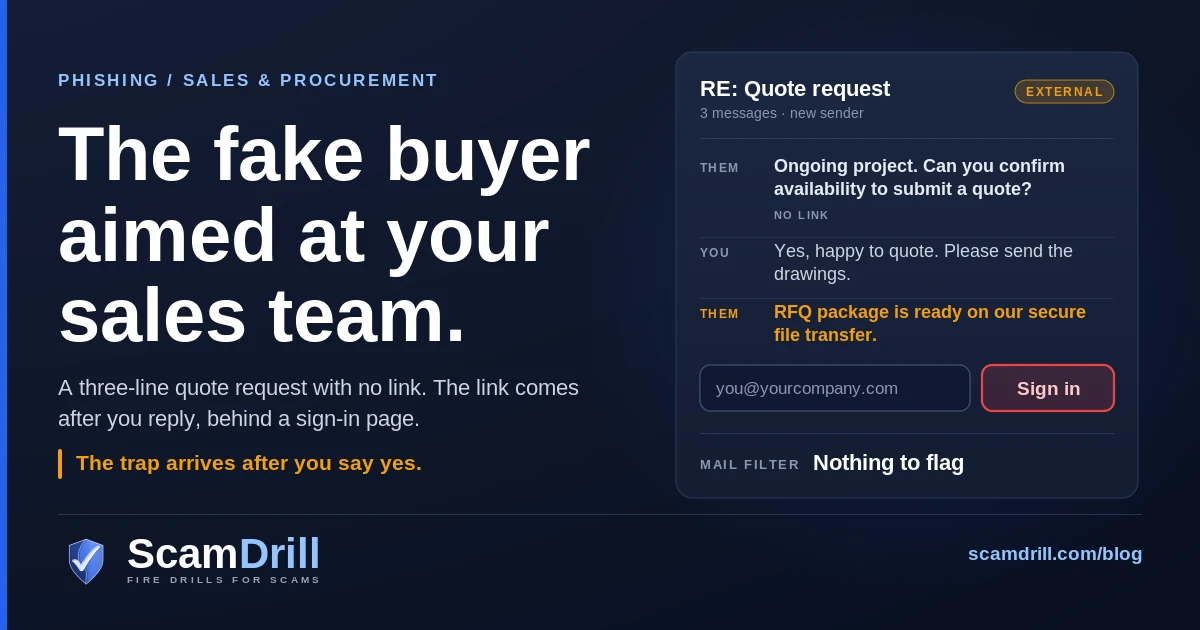
Phishing emails dressed as a request for quotation went up twelve-fold between October 2025 and September 2026, according to research Fortra published on 15 October. They target the people whose job is to answer strangers: sales, estimating, procurement, customer service. The first email usually has no link at all. It just asks whether you can quote, and the trap arrives after you say yes. The defence is a short buyer check before anyone opens a “project portal,” plus one rule: a quote package never needs your work password.
Most phishing training is built around a single instinct: don’t open things from people you don’t know. That instinct is useless to a salesperson. Their quota depends on opening things from people they don’t know, quickly, before a competitor does.
So consider an ordinary Tuesday for an estimator at a twenty-person fabrication shop. An email arrives from someone signing as a purchasing manager. It is three lines long. There is an ongoing project, they are collecting bids, can you confirm availability to submit a quote? No attachment. No link. Nothing for a filter to object to, and nothing for a cautious person to object to either. The estimator replies the way they reply to every inquiry: yes, happy to quote, please send the drawings.
The drawings arrive as a link to a “secure file transfer.” The file transfer wants a Microsoft 365 sign-in before it will show the package. The estimator signs in, sees an error or a blank folder, assumes the buyer’s system is clunky, and goes back to work. The attacker now has a mailbox full of customer names, price lists, open invoices and the payment instructions customers are used to receiving from that address.
That composite is not invented from nothing. It is the sequence Fortra’s threat research team laid out after a year of tracking request-for-quote lures, and it is worth understanding in detail, because the controls most businesses rely on are aimed at the wrong email in the thread.
Seven signs a quote request is really a login grab
None of these is proof on its own. Real buyers write short emails too. Fortra makes the same point: the indicators matter in combination, and two or three together should trigger a check before anyone clicks.
- The project has no name. “An ongoing project,” “an upcoming requirement,” “our current tender.” A real RFQ usually carries a reference number, a scope, quantities or a deadline. A lure stays vague so it fits every recipient.
- The first message asks for a reply, not a click. “Confirm availability.” “Let us know if you can submit a quote.” Fortra describes the opener as “usually sparse by design.” The reply is the point: it tells the attacker a human reads that inbox, and it makes the next email part of a conversation you started.
- The company and the domain don’t match. The signature says a regional construction firm; the address is a webmail account, a domain registered last month, or a near-miss spelling of a real company. Fortra counted 664 distinct sender domains across the RFQ lures it tracked, so there is no single bad address to watch for.
- The documents live on a portal you have never used. “Project documents,” “drawings,” “an RFQ package,” a “procurement portal.” Those are Fortra’s words for what the second-stage link pretends to be. If you bid through a platform, you know its name. A new one, sent cold, is unverified until proven otherwise.
- You have to sign in to see the files. This is the one that matters most. A buyer who wants your price has every reason to make the drawings easy to open. A page that asks for your Microsoft 365 or Google Workspace password before it shows a PDF is asking for the thing it actually wants.
- The sign-in shows up after a harmless step. Pick a meeting time, then sign in “to sync the booking.” Open the folder, then sign in “to verify your identity.” The harmless step is there to make the prompt feel like part of a process.
- It came to you through a colleague. “Someone emailed reception looking for sales, forwarding it over.” Your coworker did nothing wrong, and their name on the forward is exactly why you might skip the checks above. More on this variant below.
Definition
RFQ phishing is a phishing attack disguised as a request for quotation or a project invitation from a prospective buyer. It targets sales, procurement and customer-facing staff, usually opens with a short no-link email asking whether you can quote, and follows up with a link to fake project documents behind a business sign-in page.
What Fortra counted: twelve times the volume in a year
On 15 October, Cadence Riddle of Fortra’s Intelligence and Research Experts team published the numbers, and Help Net Security wrote them up the next day. Three figures carry the story.
- 12-fold. Malicious emails containing the term “RFQ” increased twelve times over between October 2025 and September 2026. Fortra frames the wider category as requests for quotation, project invitations and procurement inquiries used as a phishing pretext.
- Nearly 73%. In nearly 73% of RFQ lures, the end of the chain was a phishing page requesting the victim’s credentials. Credential phishing was the most common outcome Fortra recorded. Malware delivery showed up too, but less often.
- 664 sender domains. The messages came from 664 distinct domains, which Fortra says may include disposable domains, webmail accounts, compromised legitimate accounts and lookalike domains of real companies.
A caution on reading those numbers. A twelve-fold rise is a rise in what one security vendor’s systems saw, not a census of every inbox in the country. It tells you the pretext has become popular with attackers this year. It doesn’t tell you your odds of receiving one this week. What makes the research useful is less the multiplier than the mechanics: it describes, step by step, a lure built to get past both the mail filter and the person.
The second stage is where the kit does its work. Fortra says the fake portal imitates Microsoft 365, Google Workspace or another business sign-in, and that depending on the phishing kit used, it may also try to collect MFA approval details, one-time passcodes, cookies or session tokens. That last part is worth pausing on. A kit that relays your login to the real Microsoft page in real time can capture the session after you complete MFA, which is why ordinary text-message codes and push approvals don’t stop it. We walked through that mechanism in our guide to adversary-in-the-middle phishing and stolen session cookies.

Stages per Fortra, “The Rise in RFQ and Project Invitation Scams,” 15 October 2026 (Cadence Riddle, FIRE). Amber marks the attacker’s move, red the point of loss, blue where you break it.
The variant that borrows a colleague
A little over two weeks before the RFQ numbers, on 28 September, Fortra security engineer Daud Jawad described a variant that does something cleverer with the same fake-buyer story. It doesn’t go to sales first. It goes to someone who isn’t in sales.
The steps, as Fortra lays them out:
- Prospect pretext. An outside sender says they want to buy and asks a non-sales employee to point them to the right person.
- Helpful response. The employee replies and offers to pass it along. Anyone would.
- Internal handoff. The sender provides a meeting-booking link and asks for it to be forwarded to sales.
- Trusted delivery. The sales rep receives a forward from a colleague they know, with a “book a meeting” button inside.
- Calendar pivot. The rep picks a date and time. The page then shows a Microsoft 365 work-or-school sign-in, presented as necessary to complete or sync the booking.
Fortra’s description of why it works is better than any paraphrase: “This is not cold sales targeted phish, it is tiered trust abuse.” The first employee was never going to click; the meeting isn’t for them. The sales rep was never going to be suspicious; the email came from the person who sits three desks away. And the attacker, as Fortra notes, did not need to impersonate a known user or compromise anyone’s mailbox to get a trusted internal sender on the message. Your own colleague provided that for free.
Fortra’s sample was a booking-page flow rather than a calendar invite file, and the post is a case study rather than a trend count, so there are no volume figures for this one. The lesson doesn’t need them. In Fortra’s words: “An internal mail forward is not automatically a trusted email.”
Train teams to validate the destination, not only the sender.
That line, from the end of Fortra’s write-up, is the most useful sentence in either post. Everything below is a way of making it a habit.
Why sales and procurement, and why filters miss it
Finance teams have spent five years being told about fake invoices and changed bank details. Many now have a callback rule, and some actually follow it. Sales and procurement mostly haven’t had that conversation, and their work has three properties an attacker likes.
Answering strangers is the job. Fortra’s point is blunt: RFQ communication is routine for sales, procurement and customer-facing teams in many organizations. Banning links for those people isn’t practical, and Fortra says so. Telling an estimator not to open bid documents from new contacts is telling them not to win new work.
The dangerous email is the second one. Most email security is strongest at the first message from an unknown sender: reputation checks, link scanning, attachment sandboxing. The RFQ opener gives those checks almost nothing. By the time the link arrives, it’s a reply in a thread your employee started, which reads very differently to both the filter and the person. The same applies to the booking-link forward, which arrives from inside your own domain.
The bait is the thing they want most. A new buyer is good news. Good news makes people move faster, and the business framing, as Fortra puts it, may lower a recipient’s suspicion when they encounter a login prompt. Nobody wants to be the rep who let a big order go to a competitor because they were fussy about a file-sharing site.
There’s a mirror image of this on the buying side, by the way. Businesses shopping for equipment are being taken by fake sellers; we covered the cloned equipment-dealer sites that take a wire for a machine that doesn’t exist last month. RFQ phishing is the fake buyer. Between the two, the people in your business who talk to the outside world about money are the ones being worked.
What a sales mailbox is worth to the attacker
The password is not the prize. The mailbox is.
Fortra lists what attackers do once they have one: search it for customer information, invoices, payment instructions, contacts and project details, then use the account to phish coworkers, customers and suppliers. The business risks it names are payment-redirection fraud, invoice manipulation, fraudulent purchase requests, exposure of customer and project data, and reputational damage. A sales inbox is particularly good for this, because customers already expect quotes, invoices and “updated remittance details” to come from it.
That’s the bridge to business email compromise, and the numbers there are not small. In its 2025 Internet Crime Report, the FBI’s Internet Crime Complaint Center logged 24,768 business email compromise complaints with reported losses of $3,046,598,558, second only to investment fraud among the losses it reported. Not every one of those started with a fake RFQ, and the FBI doesn’t break them down that way. But a compromised mailbox that customers trust is the raw material for exactly that kind of loss. We wrote up the most common version, where a supplier’s real hacked inbox announces new bank details, in our guide to vendor email compromise. If your sales inbox is taken, you become that supplier.
Cyber insurers are seeing the same direction of travel. Coalition, whose new risk briefing draws on claims from more than 110,000 policyholders, says (as reported by Risk & Insurance this week) that BEC claims rose roughly 30% in 2025 compared with the second half of 2024, and pointed to subscription phishing kits that make the attack cheap to run at small businesses that used to be considered too minor to target. One kit it named, EvilTokens, had compromised more than 12,000 inboxes across over 10,000 organizations, for an initial cost of $1,500 and a $500 monthly subscription. (EvilTokens is the same kit we covered in our post on device code phishing in Microsoft 365.) Coalition also said average BEC losses remain under $30,000. That is survivable for most businesses. It is also the kind of number that gets written off quietly and never fixed.
A buyer check your sales team will actually do
The goal is a check fast enough that a busy rep does it every time, and strict enough that it breaks the chain at the right step. Fortra’s recommendation is to verify buyers independently, using contact details from an official website, an existing vendor record or a public business directory, never only what the unsolicited message supplies. Here is that turned into a routine.
- Reply freely; open nothing yet. Saying “yes, we can quote” is fine. It costs you nothing and you’d say it to a real buyer anyway. The check starts when a link arrives.
- Find the company yourself. Search the company name, not the domain in the email. Does the website exist, does it match the sender’s domain, does the person exist there? Two minutes.
- Call the number you found. Not the one in the signature. Ask for the person by name and mention the project. A real purchasing manager will know what you mean. A fake one has no phone.
- Ask for the documents as attachments, or on a platform you already use. Most legitimate buyers can email a PDF. If they insist on their own portal, that’s fine once step 3 has confirmed they’re real.
- Never type your work password into a buyer’s site. Not to view files, not to book a meeting, not to “verify.” If a real buyer’s portal needs an account, it will be an account on their platform, created with your email address, not a Microsoft or Google sign-in page asking for your company login. When in doubt, Fortra’s advice is to confirm both the buyer and the platform through an independent channel first.
Notice what that list doesn’t ask for. It doesn’t ask reps to judge whether an email “looks phishy,” which is a skill that degrades every time attackers improve their writing. It asks for two concrete facts: does this company exist where they say it does, and is this page asking for my password. Those questions have answers.
Indicators per Fortra (15 October 2026), which notes none is conclusive alone. Real buyers send short emails too; the sign-in row is the one that decides it.
The rule for the booking-link forward
If you forward a prospect’s link to a colleague, say in the forward that you haven’t checked it. If you receive one, treat the link as coming from the outside sender, not from your coworker. And Fortra’s rule, word for word: “if a booking page asks someone to sign in to Microsoft 365 after they select a time, stop and verify it through a known channel.”
What IT should change this month
Fortra splits ownership sensibly: sales and procurement leadership own the buyer-verification procedure, and security or IT own detection, account protection and incident response. For a small business, “IT” might be one person or a managed service provider. Either way, this is the list I’d hand them.
Make the stolen password worth less
The single biggest control is MFA that a relay page can’t pass through: passkeys or FIDO2 security keys for the accounts that face the outside world, starting with sales, estimating, procurement and anyone who sends invoices. Pair it with conditional access rules that only allow sign-in from managed devices, if you have them. Number-matching push and text codes are better than nothing, but a kit that captures the session after you approve will walk past them.
Detect the pattern, not the address
With 664 sender domains in one vendor’s sample, a blocklist won’t keep up. Fortra says reputation and blocklists remain useful but cannot be the sole basis for detection, and suggests flagging combinations instead: RFQ language, new or low-reputation sender domains, unfamiliar link destinations, reply-to mismatches and recurring message templates. If your mail platform supports custom rules or tags, an “external RFQ” banner on those combinations is a cheap first step.
Watch for what happens after a bad sign-in
The mailbox abuse leaves marks. Alert on new inbox rules (especially ones that move or delete messages containing words like “invoice,” “payment” or “bank”), new forwarding to outside addresses, sign-ins from unexpected locations right after a link click, and a sudden burst of outbound mail from a sales account. Fortra’s advice for the booking variant is to connect the dots: the original external email, the internal forward, the click on the booking domain, and the sign-in activity around it. Email logs alone may not show the whole path.
Give exposed teams a safe place to check things
Fortra’s point that banning links is impractical cuts both ways: if reps can’t refuse the link, they need somewhere to send it. A report button, a shared mailbox, a named person. Fortra also recommends analysing suspicious links only in an isolated environment rather than on a production workstation, keeping the original messages with full headers, and reporting confirmed phishing domains to hosting providers, registrars and email security vendors.
If someone already signed in
Assume the attacker has the session, not just the password, and work in this order. Our business incident response guide covers the wider process; this is the short version for a captured mailbox.
- Revoke sessions, then reset the password, from a clean device. In Microsoft 365 that means revoking the user’s sign-in sessions as well as changing the password, because a stolen session token can outlive a password change. Re-register MFA if there’s any chance the attacker added a method of their own.
- Check the mailbox for changes the attacker made. Inbox rules, forwarding addresses, connected apps, delegated access. Remove what you didn’t set up.
- Look at sent mail and deleted items for the last few days. You’re looking for messages to customers or suppliers your employee didn’t write, especially anything about payment details.
- Warn the people who matter, by phone. If the account emailed customers, call them and tell them not to act on any change to payment instructions from that address. Email warnings from a compromised account are worth very little.
- If money moved, call your bank immediately and file at ic3.gov. Speed matters for any chance of a recall, though nothing guarantees one.
And tell the person who clicked that reporting it quickly was the right thing to do. The rep who admits a bad sign-in within ten minutes is protecting the business. The one who’s afraid to admit it gives the attacker a week.
How to drill it without spooking your pipeline
This is an attack that rewards practice, because the moment that matters (a sign-in page after a reasonable-looking step) is easy to rehearse and hard to reason about cold. A few rules for simulating it well:
- Simulate the second email, not just the first. A single cold RFQ with a link tests the wrong thing. The realistic drill is a short opener, then a document link once someone replies. That’s where the lesson lives.
- Never use a real customer or prospect name. Invent the buying company. Using a real one in a simulation damages a relationship you need, and teaches staff to distrust real buyers.
- Include the forwarded version. Send the opener to someone outside sales, asking to be connected. See whether the forward goes through with a warning or without one.
- Measure reports, not just clicks. A team where most people click but someone reports within minutes is in better shape than one where few click and nobody says anything.
- Debrief with the five-step buyer check. The point is a habit people can repeat when they’re busy, not a score.
If you want to run this without building it yourself, ScamDrill for organizations includes a supplier purchase-order and quote-request scenario built for the people who handle orders, and the product tour shows how a simulation and its debrief look from the admin side. For the wider picture of how these pretexts are built, our guide to social engineering aimed at small businesses is the companion piece.
What to do now
Three things, roughly fifteen minutes each.
- Send your sales, estimating and procurement people one sentence: a quote package never needs your work password, so if a buyer’s link asks for it, stop and send it to IT.
- Agree the buyer check: find the company yourself, call the number you found, and get documents as attachments or on a platform you already use. Write it down where new hires will see it.
- Ask IT or your provider two questions: which of our outward-facing accounts could move to passkeys or security keys this quarter, and would we get an alert if someone created an inbox rule on a sales mailbox tonight?
None of this makes your team immune. It moves the decision from “does this email look real” to “did I check the company, and is this page asking for my password,” which is a question a busy person can answer in the middle of a good day.
Practise the fake buyer before a real one shows up
ScamDrill sends your team realistic practice phishing, including a purchase-order quote request whose “schedule” link goes somewhere it shouldn’t, and coaches whoever clicks, privately. Nobody is named and nobody is graded.
Start a free trial