Microsoft 365 Account Takeover: Why a Password Reset Isn’t Enough
Bottom line up front
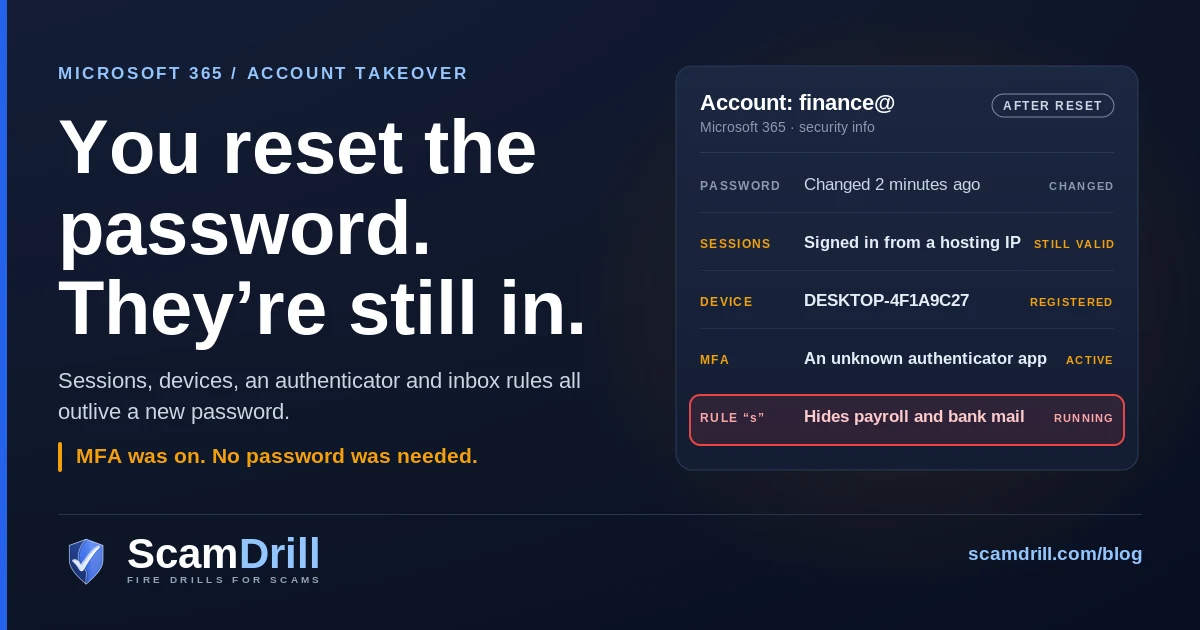
When a Microsoft 365 account is taken over with a stolen session, changing the password is the step that matters least. In a campaign Huntress tracked across 79 organizations this summer, attackers got in without a password, past MFA, then registered their own devices and authenticator apps and set inbox rules to hide payroll mail. Huntress’s own words: “A password reset alone does not remove attacker-registered devices or MFA methods.” Evicting someone means revoking sessions, deleting what they added, and only then resetting the password.
At 17:18 UTC on 21 July, an employee at one of Huntress’s customer organizations reached a Microsoft sign-in prompt that was being relayed through a server the attacker controlled. They signed in. They approved MFA. Nothing unusual happened on their screen.
Twelve minutes later the session they had just created was being used from an address at a hosting company in Hamburg. Thirteen minutes after that, from a third. At 18:08 a new authenticator app, labelled “iPhone 13,” was activated on the account. Fifty minutes from one sign-in to an attacker holding their own second factor.
Now picture the usual response when someone in that company notices something odd a week later. IT resets the password. Maybe forces a fresh MFA prompt. Everyone relaxes. The attacker’s iPhone 13 answers that prompt just fine, because as far as Microsoft is concerned it belongs to the user.
That gap, between what a reset feels like it does and what it actually does, is what this post is about. Huntress published the campaign on 22 October, and the same week Microsoft and Huntress were both writing up a second, unrelated route past MFA through a backup vendor’s app. Between them they make the same point from two directions: on Microsoft 365, the password stopped being the thing that keeps people out some time ago.
Six things that survive a password reset
If an account was taken over through a stolen session or token, assume each of these is still in place after the password changes, until someone has checked and removed it.
- Sessions and tokens already issued. A refresh token or signed-in session is proof of a login that already happened. Changing the password doesn’t reach back and cancel it on its own. You have to revoke sessions explicitly, and even then an access token can keep working until it expires.
- A device the attacker registered. In the Huntress campaign the scripted half of the operation registered rogue devices in Entra ID, named like DESKTOP- followed by eight hex characters. Huntress counted at least 48. A registered device can be used to ask for fresh tokens later.
- An MFA method the attacker added. In 19 organizations the attacker wiped the user’s existing MFA methods and registered a new one within three hours of first signing in. After that, every “approve this sign-in” goes to them.
- Inbox rules. Rules named a single dot, “s”, “sss”, a comma. They mark mail as read and move it to folders nobody opens, such as RSS Feeds or Conversation History. One hid anything mentioning payroll, direct deposit, bank or bonus. Rules keep running whatever the password is.
- Apps and app credentials. An OAuth app a user consented to, or a secret added to an existing enterprise app, authenticates on its own. In the ConnectWise case below, new secrets were set to expire in 2028.
- Forwarding and delegated access. A forwarding address or a delegate on the mailbox will carry on quietly after a reset. It’s the oldest trick here and still one of the easiest to miss.
Definition
Token replay is a Microsoft 365 account takeover where the attacker steals the proof of a completed sign-in (a session cookie or refresh token) instead of the password, then reuses it from their own machine. MFA was satisfied when the token was issued, so nothing prompts. Changing the password doesn’t cancel it.

Items per Huntress, “Token Replay and Spray,” 22 October 2026, and Huntress on the ConnectWise app credential, 16 October 2026. Amber marks what the attacker left in place, red the point of loss, blue what removes it.
What Huntress found across 79 organizations
Huntress says it responded to related incidents at 79 organizations between 14 July and 22 September 2026. Over those ten weeks it counted 497 successful sign-ins and more than 200,000 failed ones. Help Net Security’s write-up quotes the line that sums it up: “The Microsoft accounts were compromised without the attacker ever needing a password.”
The tokens came from three places, according to Huntress:
- Adversary-in-the-middle relay pages, which pass the real Microsoft login and MFA prompt through to the victim and keep the token Microsoft hands back. We covered how those relay pages work in July.
- Device-code phishing, where the victim types a code into Microsoft’s genuine device login page and, in Huntress’s words, “directly hands” the attacker a valid refresh and access token. That one has its own guide, including how to block it in Entra.
- Social engineering during a legitimate login, which is the vaguest of the three and probably the most varied.
The stolen tokens were then replayed, “sprayed” in Huntress’s phrase, from a block of addresses at a Hamburg hosting provider. There were two distinct builds. One was scripted, announced itself with a user agent of node, asked for tokens directly and registered those DESKTOP- devices. The other looked like an ordinary Chrome or Edge browser on Windows and registered nothing. The operation ran in four phases with gaps between them, and moved address and relay provider along the way. Huntress’s comment on that is worth passing to whoever runs your firewall: “Blocking any single address would have stopped one phase at most.”
Speed went up as the summer went on. On 21 July the gap between the victim reaching the MFA prompt and the attacker using the hijacked session was twelve minutes. On 22 September it was four.
What they did once inside is the part a small business should study. The inbox rules weren’t created from the hosting block at all. They came through commercial VPNs and a spread of other providers, which means a single “sign-ins from this suspicious network” alert would have caught the break-in and missed the follow-up. One mailbox sent spam to hundreds of outside recipients before Microsoft’s own risk scoring flagged it. And in one organization, the rule that hid payroll and bank mail was edited, then five minutes later a second rule was created to bury mail from the company’s outside accountant. A payroll-related email went out to that accountant from the compromised account.
That is the playbook from our payroll diversion guide, run on a mailbox the attacker had already secured against the obvious fix.
Why MFA was on and didn’t matter
I don’t want to overstate this, because MFA still stops an enormous amount of password-based attack and nobody should read this as a reason to turn it off. But ordinary MFA guards one moment: the sign-in. A code, a push approval, a number match. Every one of those can be completed by the real user on a relayed page, and once it’s completed Microsoft issues a token. The token is what the attacker wants.
Device-code phishing is the cleaner version of the same idea. The victim does everything on Microsoft’s real site, and the token goes to a device the attacker is holding. There’s no fake page to spot.
Huntress’s position is that this is preventable with configuration, and it says so plainly: “Token replay attacks can be prevented with properly implemented Conditional Access Policies.” We’ll get to what that means for a small tenant below. The short version is that the policy has to cover every user, every app and every client type, because attackers go looking for the one combination that was left out.
The same month, a second way past MFA: a vendor’s app
While the token-replay campaign was winding down, a different one came through a door most small businesses have never looked at.
On 16 October, Huntress reported that the credential behind ConnectWise Cloud Backup (the Microsoft 365 backup product formerly called SkyKick) was being used to sign in to customer tenants. By that evening it had confirmed unauthorized sign-ins in 162 tenants. A day later it had found almost 1,000 Entra tenants with sign-in activity from the attacker’s address, and more than 300 where those sign-ins succeeded. In one tenant, a ConnectWise app assigned itself Global Administrator and new secrets were added to two other applications, one of them Huntress’s own, set to expire in 2028.
On 21 October, Microsoft Threat Intelligence attributed the campaign to a group it tracks as Storm-0940, which it says used an agentic AI penetration-testing framework to “attempt to sign-in to more than 2,250 tenants.” That figure is attempts, not confirmed breaches, and a lot of the coverage has blurred the two. Microsoft also says that an affected app or a successful sign-in “does not necessarily indicate that customer data was accessed or exfiltrated,” and in the two tenants Huntress reviewed in depth it found no mailbox or file changes. Fair enough. The lesson doesn’t depend on how much was taken.
The lesson is this. An app with permissions in your tenant signs in with its own credential, and MFA doesn’t apply to it. Your staff’s passwords were irrelevant. And the cleanup trap is the same one as above. Huntress again: “Disabling M365 apps, including the abused ConnectWise apps will not remove credentials that were already added. You must review the credentials on all of your M365 applications.” Microsoft’s first instruction was not to delete anything in a hurry: “Do not delete enterprise applications as the first response. Preserve configuration and evidence before making irreversible changes.”
We made a similar point about remote-access tools in the rogue RMM post: the software you trust is only as trustworthy as whoever holds its keys this week.
How to actually evict them, in order
Order matters here more than people expect. Reset the password first and you’ve tipped off an attacker who still has a device and an authenticator, and who may add more before you get to them. This is the sequence I’d use for one compromised user. If you have an IT provider, hand them this list and ask them to confirm each step back to you in writing.
- Save the evidence. Export the user’s sign-in logs and the tenant audit log before you change anything. Note the IP addresses, the times, any device names and any app names. You may need this for your insurer, your bank or a lawyer.
- Block the account and revoke sessions. In the Entra admin center, disable the account, then choose Revoke sessions on the user’s overview page. Microsoft’s own guidance is that after this the user “can’t gain new tokens for any application,” but access tokens already issued keep working until they expire. Microsoft documents a one-hour default; Huntress cites about 90 minutes. Plan for the attacker to have that long.
- Remove their devices. Check the user’s registered devices and the tenant’s recent device registrations. Look for names the user doesn’t recognise, especially DESKTOP-, Device- or Work Pc plus a random string, registered from a hosting or VPN address.
- Remove their MFA methods. Open the user’s authentication methods and delete anything the user can’t personally identify, phone by phone. “iPhone 13” means nothing on its own. Ask them which phone they own.
- Clear the mailbox. Inbox rules, forwarding, delegates, and anything sent or deleted during the attacker’s window. Rules with one-character names that move mail to RSS Feeds or Conversation History are a strong tell.
- Check apps. Look at the user’s consented apps, and at the tenant level any app with a new secret or certificate or a role it didn’t have last month. Disable, don’t delete, until you’ve recorded what you found.
- Now reset the password and re-register MFA, from a clean device, with the user present or on a call to a number you already had. If you can, make the new method a passkey or security key.
- Re-enable and watch. Keep an eye on that account’s sign-ins and the tenant’s new device and MFA registrations for at least a few weeks. Repeat the checks on anyone the account emailed during the window.
ScamDrill analysis, built from Microsoft’s “Revoke user access in Microsoft Entra ID” guidance and the Huntress and Microsoft Threat Intelligence remediation advice. Token lifetime: Microsoft documents a one-hour default; Huntress cites about 90 minutes.
Two warnings from the Huntress team that are easy to get backwards. First: “Revoke sessions and reset the password. A password reset alone does not remove attacker-registered devices or MFA methods.” Second, aimed at the people running alerts: “Do not trigger response based on spray volume, as it points at the most-sprayed, least-compromised tenants.” The noisy tenant is often the one that held. The quiet one with four successful sign-ins is the problem.
For the wider incident (who to call, what to tell staff, the 72-hour clock) our business incident response guide has the full sequence, including what to do if a business email account was used to send anything.
The part finance has to do
The technical eviction can be done perfectly and the money can still go. Rules exist to hide something, so once you’ve found them, read what they were hiding.
- If a rule mentioned payroll, direct deposit or bank, phone your payroll provider and check whether any employee’s bank details changed during the window. Confirm by phone with the employee, using a number from your HR records.
- If a rule targeted a specific outside contact (an accountant, a supplier, a customer), phone that person. Ask what they received from you and whether anything asked them to change payment details. Assume they got a convincing email from a real address.
- If money already moved, call your bank’s fraud line straight away and ask for a recall, then file at ic3.gov. Speed matters far more than completeness. A recall isn’t guaranteed, and the earlier the call the better the odds.
If the compromised mailbox belongs to someone who talks to suppliers about invoices, the vendor email compromise guide covers the callback rule worth putting in place permanently.
What stops the next one
None of this needs a big security budget. Most of it is settings that already exist in your tenant and are sitting at their defaults.
- Phishing-resistant sign-in for the accounts that matter. Passkeys and FIDO2 security keys won’t complete a sign-in for a lookalike domain, which is what kills the relay-page route. Start with admins, finance and anyone who receives a lot of outside email.
- Conditional Access that covers everything. Huntress’s recommendation is to require MFA (or block) “for All Users, All Cloud Apps, and All Client App types, unconditionally.” Exclusions are where these campaigns live. Conditional Access is a paid Entra feature, so check which Microsoft 365 plan you’re on; if you don’t have it, Microsoft’s security defaults are the floor.
- Block device code flow for everyone who doesn’t need it, which in most small businesses is everyone.
- Make device registration and MFA registration harder. Require MFA to register a device or a new authentication method, and alert on both. A new authenticator on a finance account at 6pm is worth a phone call.
- Stop users consenting to apps on their own, and review the enterprise apps already in your tenant, including which vendor apps hold admin-level permissions. Ask your backup, security and MSP tools to tell you what they can do in your tenant, in plain language.
- Alert on inbox rules and forwarding. It’s one of the cheapest detections there is and it would have caught several of the Huntress cases at the payroll step.
If an MSP runs your tenant
Plenty of small businesses never touch the Entra admin center. That’s fine, but then the questions above belong to your provider, and you should ask them in writing. Three I’d send this week:
- When an account is compromised, does your process remove registered devices and MFA methods, or only reset the password?
- Which third-party apps in our tenant have admin-level permissions, and did you check for new secrets after the ConnectWise incident?
- Do we get an alert when someone creates an inbox rule, sets up forwarding, or registers a new MFA method?
A good provider will have quick answers. If the answers are slow, that tells you something too.
Where people come in
It’s tempting to read all this as a purely technical problem. Mostly it is. But look at where the token-replay campaign started: a person signing in from a link, or typing a code they were sent. The relay page and the device-code lure both arrive by email or chat, usually dressed as a shared document (sometimes a genuine one from DocuSign or Dropbox), a voicemail or a security check. That moment is trainable, and the reflex is simple. If you didn’t go looking for a sign-in, don’t complete one, and never enter a code your own screen didn’t just show you.
The other trainable moment is reporting. A user who mentions “my authenticator asked me to set up again, weirdly” on the day it happens hands you the attack at step one instead of step five. The Huntress timeline gives you about fifty minutes between those steps. A culture where people report odd sign-in moments without feeling foolish is worth more in that window than any tool.
ScamDrill for organizations runs realistic email phishing drills for exactly that moment, including document-share lures that end at a sign-in page staff shouldn’t trust, and coaches whoever clicks privately. It doesn’t replace any of the configuration above, and I’d be suspicious of anyone who told you training could. The product tour shows what a drill and its debrief look like from the admin side, and the 30-day simulation plan is a sensible first month.
What to do now
- Today: write the eviction order above into whatever you’d grab during an incident, and make sure “remove devices and MFA methods” sits above “reset the password.”
- This week: send your IT provider the three questions. If you run the tenant yourself, look at the last 30 days of device registrations and new MFA methods. It takes ten minutes and you’ll either sleep better or learn something important.
- This quarter: passkeys or security keys on admin and finance accounts, device code flow blocked, and an alert on new inbox rules.
None of that makes a tenant untouchable. It does mean that the next time someone signs in from the wrong link, the cleanup takes an afternoon instead of turning into a payroll problem three weeks later.
Practise the sign-in that shouldn’t happen
ScamDrill sends your team realistic practice phishing, including document shares and security alerts that end at a sign-in page they shouldn’t trust, and coaches whoever clicks, privately. Nobody is named and nobody is graded.
Start a free trial