The “Passkey Migration” Call: How Attackers Turned Microsoft’s MFA Change Into a Pretext
Bottom line up front
Microsoft really is moving Entra ID users off SMS and voice MFA and onto passkeys, and the main cutoff is February 1, 2027. Canada’s Cyber Centre warned on October 28 that callers posing as internal IT are telling staff a passkey migration is urgent, then steering them to a lookalike enrollment page that relays the password and MFA response to the real sign-in. From there the attacker adds their own MFA method, deletes the alert emails and takes files for extortion. Passkeys are the right move and you should make it. Run the rollout so that no step ever begins with an unexpected phone call.
Two things were published on October 28, and as far as I can tell neither one mentions the other.
BleepingComputer reported Microsoft’s latest reminder to Entra ID admins, sent through the Microsoft 365 Message Center: get your users onto phishing-resistant sign-in before SMS and voice authentication retire in February. The same day, the Canadian Centre for Cyber Security published Alert AL26-028, about an ongoing campaign in which people phone employees at Canadian organizations, claim to be internal IT or the help desk, and say an urgent passkey migration, MFA enrollment or password change can’t wait.
Your staff may have been seeing real passkey prompts at sign-in since September. Some have had a real email from IT about it, or will soon. So when a stranger rings at 3:40 on a Tuesday and says the passkey migration is overdue, very little of that sentence sounds invented. Most of it is true.
Let me be plain, because this could be read the wrong way. Passkeys are good. You should move to them, and the attack described here is one they’re built to resist. The dangerous stretch is the one many firms are in right now, before and during the move, when everyone has heard something is changing and hardly anyone could say what it ought to look like.
Our help desk vishing playbook covered the fake “mandatory security migration” back in August, in general terms. This is the follow-on. The fake migration now has a real one to stand behind, with a date on it, and if you run a 12-person law office or accounting practice on Microsoft 365 with outsourced IT, it fits how your firm is set up uncomfortably well.
Six signs the passkey call isn’t your IT
These are for everyone on staff, and you can paste them into an email today.
- The first you hear of it is a ringing phone. A real rollout starts with a written notice and then a prompt when you sign in. A call out of nowhere about enrolling is the warning.
- The caller gives you a link, or reads out a web address. The Cyber Centre describes pages on lookalike domains that carry the target’s name, along the lines of
<org-name>.registermymfa[.]comor<org-name>sso[.]com. Seeing your firm’s name in the address tells you nothing, since anyone can put it there. - You’re asked to read out a code, or approve a prompt, while they wait. Setting up a passkey comes down to your own fingerprint, face or PIN on your own device. There’s nothing in it to read to another person.
- They say you’ve missed a deadline, or they drop a colleague’s name. The alert lists both as credibility props. Your IT person’s name may well be on LinkedIn, and the February date has been in the trade press since at least the summer.
- They’re on your personal mobile, or the caller ID looks exactly right. Both happen. Google’s researchers say personal phones pull you away from normal support channels, and the alert says help desk numbers may be spoofed. A correct-looking number clears nothing.
- The call ends when you try to check. The Cyber Centre notes that callers may hang up if the employee attempts to verify independently. A real technician can wait ten minutes. If “I’ll ring you back on the usual number” gets you a dead line, you have your answer.
Definition
Passkey migration vishing is a phone scam in which a caller poses as internal IT, says an urgent move to passkeys is due, and sends the employee to a lookalike enrollment page. The page relays the password and MFA response to the real sign-in as they’re typed, which hands the caller a live session.
Why a real change makes the best lie
Start with what Microsoft is actually doing, because your staff deserve a straight version of it. Microsoft has decided SMS and voice calls are too weak to keep as a second factor, and it is ending its own delivery of them in Entra ID. Its retirement page sets out the dates:
| Date | What happens |
|---|---|
| September 1, 2026 | Passkeys start becoming the default, rolling out organization by organization. Anyone enabled for SMS or voice is prompted to register one after completing MFA at sign-in, and by default can snooze that as often as they like. |
| October 30, 2026 | Tenants with a real business or regulatory need for SMS or voice can start configuring a paid third-party provider through Microsoft Security Store. |
| February 1, 2027 | Microsoft-provided SMS and voice end for everyone except Global Administrators and external users. A user whose only MFA method is SMS or voice has to register a passkey during sign-in before they can carry on. There’s no opting out of this. |
| July 1, 2027 | The same thing happens for Global Administrators and external users. |
Not everyone will hit the blocking prompt, either: Microsoft’s FAQ says people who already use authenticator app codes won’t, although those codes don’t count as phishing-resistant.
Why does all that suit a caller so well? Mostly because the hard part of their job is already done. A year ago they’d have had to explain what a passkey was. Now the person answering may have snoozed the prompt half a dozen times and feels a little guilty about it, which is a perfectly normal way to treat a prompt that invites you to snooze it, and it makes “you’re on our overdue list” land.
They also don’t need to know anything about your firm, or even whether your tenant is in scope. An office that moved everyone to the authenticator app years ago will still have heard the word migration somewhere. And the story keeps working after the call. Google’s May report on this group points out that the pretext gives a ready explanation for any security alerts the compromise sets off. An email saying a new sign-in method was added looks like confirmation that IT did what IT said it would.
Then there’s the calendar. February 1 lands just after the holidays, and I’d guess plenty of small firms will get to this in December and January, with thin staffing and an MSP on a skeleton crew. That’s my guess, and nobody has published a number. But a callback line nobody answers on December 23 is how a careful employee ends up giving the caller a second chance.

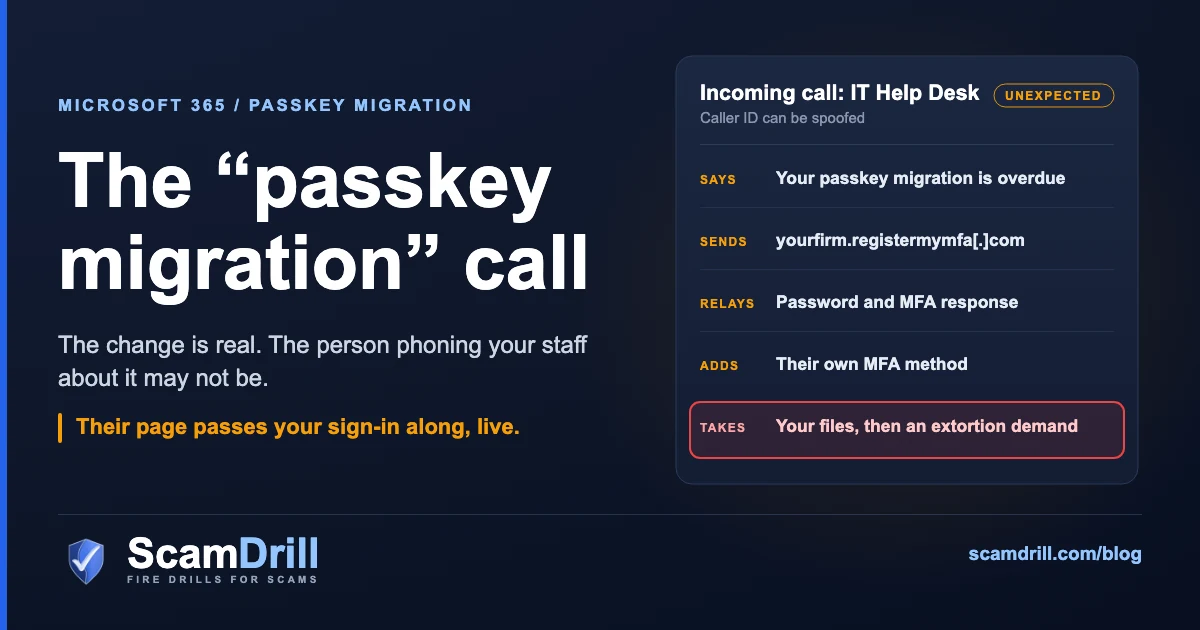
Dates per Microsoft Learn, “Passkeys by default and retirement of Microsoft-provided SMS and voice authentication.” Attack chain per Canadian Centre for Cyber Security Alert AL26-028, 28 October 2026. Slate marks what is real, amber the attacker’s moves, red the point of loss.
What the call sounds like, step by step
This comes from the Cyber Centre’s alert and the two Google Threat Intelligence reports it cites, on a cluster Google tracks as UNC6671. The sample call below is mine, since nobody has published a transcript.
The phone rings
The target gets a call on a personal mobile or office phone, or through Microsoft Teams, and the number may be spoofed to match the real help desk. According to Google, the callers are typically people hired for the job. They may name real internal IT staff or a deadline you supposedly missed, which turns a stranger’s request into a task already on your list.
“Hi, it’s Mark from IT. I’m working through the passkey migration list and you’re one of the last few showing as not done. Have you got two minutes? It has to be finished today or the account locks.”
At a 12-person firm, “IT” may be an outside MSP that staff have never spoken to: a ticket portal and a name on an invoice. There’s no voice to recognize, so nobody can check this by instinct, and I don’t think anyone should feel bad about that. It’s why the fix further down is a rule about process. If the call or chat arrives through Teams from outside your tenant, our Teams post covers the settings for that door.
You land on a page with your firm’s name on it
Your organization’s name appears as a subdomain of something generic, or it’s built into a newly registered domain. The names usually pair an action (enroll, register, activate) with an authentication term (passkey, SSO, MFA), and the alert also lists okta, internal, signin, portal and setup. Google’s August report names root domains like passkeyhelpdesk[.]com and addssopasskey[.]com, and counted a new domain roughly every 1.6 days across June and July, so blocklists age quickly.
The page passes everything along, live
You type your username and password, and the page hands them straight to the real sign-in. The real sign-in asks for your MFA response, the page shows you that request, and you complete it, because this is what the caller said would happen. Now the attacker holds an authenticated session. Google lists pushes, text codes and app codes as all being caught this way, and we went through the mechanics in our piece on adversary-in-the-middle phishing. What the phone adds is a person who can talk you past any hesitation.
Then it goes quiet
The attacker registers their own MFA method or device so the access survives, then deletes the password-reset, MFA-change and security notification emails. They may also use the mailbox to reset passwords on apps that sit outside single sign-on. Take a moment on those deleted emails, because at a small firm the notices may be the only alarm there is. If they land in the compromised mailbox and nowhere else, the one person who’d have noticed never sees them.
Then the files go, and the demand arrives
Scripts and Microsoft Graph pull data from Microsoft 365 and connected SaaS apps, including SharePoint and OneDrive, and an extortion demand follows. Google reported first demands of $1 million to more than $3 million, often cut by half or more in negotiation, with final payments averaging $750,000 in just over half of the cases it tracked from January to May 2026. Much of the targeting it saw that spring was aimed at large enterprises, so please don’t read those figures as the price tag for a 12-person practice. I’d worry more about what’s in the folders. By July, Google says, the targeting had narrowed to the financial and legal sectors, law firms included, and it suspects confidential deal and litigation data is the draw.
Does this reach US firms?
This is a Canadian alert, and I’m not going to stretch it into a claim about US victims. I would treat it as an early warning for anyone on the same tools, since nothing in the chain depends on being in Canada: same Microsoft 365, same Microsoft dates. Google assesses the group has targeted dozens of organizations across North America, Australia and the UK. Separately, the FBI warned US law firms in May 2025 about a different crew, Silent Ransom Group, calling staff while posing as their IT department. One of its recommendations was to write down and communicate when and how your IT will identify itself to employees, which is close to the whole of my advice below.
What a real passkey migration should look like
Your staff can’t spot a fake if nobody has told them what the real one looks like, and honestly I suspect most firms haven’t got around to that yet. Here’s the version to aim for.
- It’s announced in writing first, by someone staff can identify, with rough dates and what they’ll see. Microsoft recommends a phased sequence of awareness, action and reminder, and says “Coordinated communications are the single biggest predictor of a smooth passkey rollout.” They’re also what makes a fake call stand out.
- It happens inside your normal sign-in. Entra’s registration campaign prompts people after they complete MFA during a regular sign-in. Anyone who wants to do it sooner can go to Microsoft’s own security info page at
mysignins.microsoft.com/security-infothemselves. - Nobody phones to start it, and nothing gets read out. A passkey opens with your fingerprint, face or PIN on your own device. If someone wants help, they ring IT on the published number. A phone call about passkeys is fine when the employee placed it.
- Missing the date isn’t an emergency. Microsoft says people won’t be locked out on the retirement date. Those who still rely only on SMS or voice get a prompt at sign-in that they have to complete before carrying on. So there’s no version of this where a stranger has to fix your account in the next ten minutes.
ScamDrill analysis. The real lines draw on Microsoft’s retirement guidance and registration campaign documentation; the call lines on Cyber Centre Alert AL26-028 and Google Threat Intelligence reporting. The “your account locks” line is an illustrative script, not a quoted call.
Why passkeys beat this, and where they don’t yet
A passkey is tied to the site it was created for. On a lookalike domain there’s nothing for your device to hand over, so the relay comes up empty. Google’s August report says this origin binding makes lookalike domains and adversary-in-the-middle proxies ineffective.
Two gaps remain, and both sit in the migration window. The first is that a passkey only protects an account once weaker methods can’t be used instead. Microsoft itself warns about downgrade techniques, and my read is that while SMS or app approvals stay on the account, a relay page still has something to ask for. The second is enrollment. Registering a new method generally takes a session that has completed MFA, which is exactly what a relay produces. That’s how an attacker ends up with their own method on the account.
How to run your migration without teaching staff to obey callers
Most of this is ordering and wording. The free parts come first, and a firm with no IT staff can do them.
1. Publish one callback number before you announce anything
One number, pinned somewhere people can find it in five seconds: your internal IT person’s, or your MSP’s main line if you don’t have one. The Cyber Centre’s instruction is to verify any unexpected IT call independently, regardless of caller ID or urgency, and to give staff a clear way to report suspicious calls and websites. The FBI and CISA gave similar general advice in October, in a notice aimed at election officials: confirm requests for sensitive information through a second channel. None of that works if the number is buried in a two-year-old welcome email. Ring it yourself. Find out who picks up on December 24.
2. Put the sentence in the announcement
Microsoft publishes end-user rollout templates, and they’re a reasonable start. Add the line they can’t write for you, which is your rule. Something like this:
Copy and adapt
Over the next few weeks you’ll be asked to set up a passkey for your Microsoft 365 account. The request will appear by itself when you sign in as usual. You won’t need a link from anyone. We will never phone you to enroll you, and nobody will ever ask you to read them a code. If someone calls about this, hang up and ring [NUMBER]. You won’t be in trouble for hanging up on the real IT person, even if that turns out to be me.
That last sentence does more work than it looks like it should. People won’t hang up on someone who might be from IT unless you’ve told them it’s safe to.
3. Let the sign-in prompt do the asking
If your own rollout email contains a “click here to enroll” link, you’ve taught everyone that enrollment links are normal, and that’s the one habit the caller needs. A registration campaign removes the link altogether. It needs passkeys enabled with self-service setup allowed, and if you switch it from Microsoft-managed to Enabled you choose the snooze period, from 0 to 14 days. In a small firm I’d tighten the snooze once people have had the notice, because a prompt that stays open for months is a prompt callers can keep referring to.
Microsoft suggests working out who’s affected first, with a PowerShell scanner on GitHub. Its own README warns that it reads policy scope and isn’t a list of users, so treat the output as a starting point.
4. Admins and finance first, even though Microsoft gives admins longer
Global Administrators get until July 2027. Please don’t take that as a suggestion. The Cyber Centre says to put phishing-resistant MFA on privileged and high-risk users first, and names FIDO2 security keys, device-bound passkeys and platform authenticators. At a small professional firm, high-risk means whoever has admin rights, whoever moves money, and whoever’s login reaches the client files. Microsoft’s automatic setting allows every passkey type, synced ones included, so make that choice deliberately for these accounts.
5. Alert on new MFA registrations, and send the alert somewhere else
The Cyber Centre’s monitoring list covers suspicious MFA registrations, scripted or high-volume Microsoft 365 file access, deletion of security emails, and newly registered domains impersonating you. If you only manage one, do the first, and route it to an admin or your MSP. An alert that goes only to the user’s own mailbox is one this crew will delete. During the rollout I’d also have someone look through each person’s registered methods once a week. It’s dull, but it catches a method nobody can explain.
6. Protect enrollment itself, if your license allows
With Conditional Access, which needs Entra ID P1 or Microsoft 365 Business Premium, you can put conditions on registering security info, for instance limiting it to trusted locations, with a Temporary Access Pass for the exceptions. The same toolbox covers the alert’s other suggestions: managed devices only, limits on sign-ins from commercial VPNs, hosting providers and residential proxies, and shorter sessions. Test any of it in report-only mode first and keep your emergency access account out of the policy.
On a plan without Conditional Access, security defaults are your floor. Those defaults also block device code flow, a related trick we’ve covered separately. Restrict outside contact in Teams, Slack and Webex where you can as well.
7. Finish the job and remove the old methods
After someone has registered a passkey and tested it, Microsoft’s advice is to take them out of SMS and voice policy scope. Do that, or the weak method stays available and the nudges keep coming. For your most sensitive accounts, a Conditional Access policy can require the built-in phishing-resistant strength. Until something like that is enforced, I’d treat the account as only partly migrated.
If an MSP runs this for you, or you are the MSP
Three questions worth sending your provider this week, in writing:
- When are you enrolling our staff, what exactly will they see, and will anyone from your company ever call them about it?
- When someone registers a new MFA method on our tenant, who gets told, and how quickly?
- What number should our staff ring to check a call, and who answers it over the holidays?
If you are the MSP, your technicians’ names are the ones these callers will drop. Agree the rule with each client up front, put your name and number in their announcement, and make it easy for people to call you back without apologizing.
If someone already enrolled on a fake page
First, thank them for telling you. They did what someone who sounded like IT asked, during a rollout that really is happening. Then work through this with whoever runs your tenant. These are the Cyber Centre’s response steps in the order I’d use. The alert lists the credential reset before removing the attacker’s methods; our eviction guide explains why I’d do the removal first.
- Save the logs before you change anything. That means identity provider and Microsoft 365 audit logs, plus the time of the call and the web address.
- Revoke active sessions and tokens for that account.
- Remove any MFA method or device the user can’t personally identify. Check the tenant for other recent registrations too, because one caller may have rung several people.
- Reset credentials from a clean device, then re-enroll on a passkey with someone they know beside them or on a number you already had.
- Review mailbox activity, including what was deleted during that window and any password-reset messages from other apps. Apps outside single sign-on need their own resets.
- Review file activity in SharePoint and OneDrive for scripted or unusually heavy access, and write down what you find.
- Bring in your lawyer and insurer before anyone replies to a demand. If client or patient data was in those folders you may have notification duties. Nobody can promise that stolen files come back, and I wouldn’t count on a payment to achieve it.
- Report it. In Canada that’s My Cyber Portal or contact@cyber.gc.ca. In the US, use IC3 or your local FBI field office.
For the wider response, including who to call and what to tell staff, use our business incident response guide.
How to drill it
There are two separate skills here, and I’d be suspicious of any program that claimed to cover both with a single click test.
The email side is straightforward to rehearse. A message saying a passkey migration is due by Friday tests the same reflex as the link a caller sends: did they stop, and did they tell someone? ScamDrill for organizations runs email drills, and the library now includes that exact lure, alongside pretexts such as Microsoft 365 alerts and IT help desk tickets. Whoever clicks lands on a short lesson, and the product tour shows a drill from the admin side. Our annual training course also has a section on phone scams, including the hang-up-and-call-back rule. To be clear about the limit: we don’t place live voice calls and we don’t send simulated texts, so a drill email rehearses the link and can’t reproduce a patient voice on the phone.
The phone side you can rehearse yourself in ten minutes at a staff meeting. Tell people it’s practice. Have someone read the sample call from above while a colleague answers, and make the colleague say the sentence out loud: “I’ll call you back on our number.” It feels a bit silly, and that’s useful, because the first time anyone says it shouldn’t be with a stranger pressing them. Then time how long it takes each person to find the number, and ring it to see who answers.
I wouldn’t spring surprise fake calls on a small team. Trust is part of what makes people report, and in an office of twelve you’ll use it up quickly. Count who reports rather than who slips. The 30-day simulation plan is a sensible first month, and our free resources include a scam glossary and quiz.
What to do now
- Today: send staff the six signs and tell them hanging up is always allowed. No tenant change needed.
- This week: pick the callback number and ring it. Send your MSP the three questions, and find out whether your tenant is in scope.
- Before the holidays: get admins and finance onto passkeys, send new-registration alerts somewhere outside the user’s mailbox, and work out who covers the phone between Christmas and New Year.
- Before February 1: everyone else, then remove SMS and voice for the people who’ve finished.
None of this slows the migration down much. The announcement was going out anyway, and one extra sentence in it costs nothing.
Start a team drill
ScamDrill sends your team realistic practice phishing email, including an urgent passkey migration notice, then assigns a short lesson to whoever clicks.
Start a team drill