Calendar Invite Phishing: The Meeting You Never Accepted Is Already on Your Calendar
Bottom line up front
Attackers are putting the lure in a calendar event, which is the one place most staff have never been taught to check. A Google Workspace campaign that Material Security tracked from mid-August sent invites from real, compromised accounts at companies the targets already worked with. Its links started on Google’s own servers, and it relayed MFA codes to the real Google sign-in as people typed them. Three things to do this week: tighten which invitations land on calendars automatically, treat calendar invites like email in your reporting and your drills, and make sure someone can shut down a stolen session within the hour.
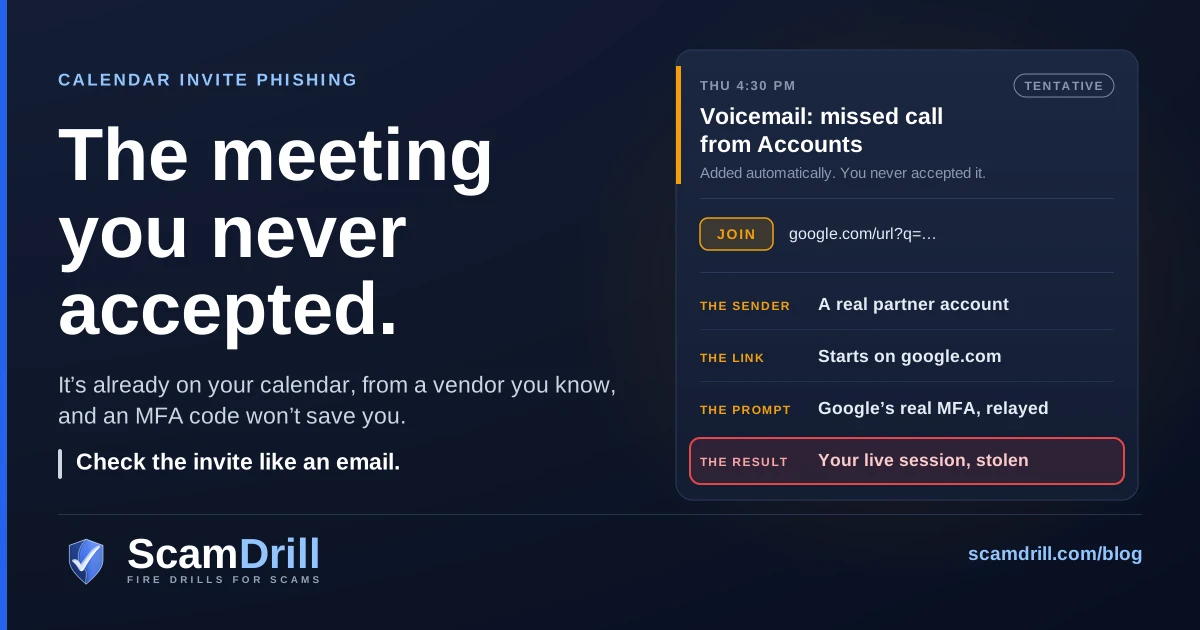
You notice the meeting because it’s already on your calendar. Thursday at 4:30, “Voicemail from Accounts Payable,” sent by someone at a supplier you pay every month. It has a Join link. You never accepted it, but there it is between two real meetings, and it looks like exactly the kind of loose end you clear before the weekend.
I made that scene up, but every piece of it comes from published research. Material Security, an email security vendor, spent the autumn tracking a campaign it calls Operation CloudFire and described it in a sponsored article on BleepingComputer on November 4 and a contributed piece in The Hacker News on November 12. The pretexts were voicemail notifications, RFP and RFI requests, court summonses and missed payment notices. The senders were real accounts that the attacker had already taken over, often at organizations the recipient had emailed before.
Both write-ups come from the vendor, and I haven’t found an independent report confirming the campaign, so I’ve kept Material’s numbers attributed to Material. The size of the campaign matters less than the route it took, though. Most small teams have spent years learning to slow down on a strange email. Hardly anyone has asked them to slow down on a meeting.
Six red flags in a calendar invite
You can paste these into a staff email. None of them needs new software.
- An event you never accepted. If it’s on your calendar and you don’t remember saying yes, your calendar added it for you. Google Calendar adds invitations from everyone unless someone has changed the setting, and Outlook puts new meeting requests on the calendar as tentative.
- A surprise meeting from a company you know. CloudFire’s invites came from real accounts at real firms. A familiar name tells you the account exists. It doesn’t tell you who is using it this afternoon.
- Urgency in the title. A voicemail you need to hear, an RFP that closes Friday, a court summons, a payment that failed. Real meetings rarely put a deadline in the event name.
- A Join or Location link that isn’t your meeting tool. A real call opens Google Meet, Zoom or Teams. A link that starts at
google.com/url, a share.google address or a Drive file is a redirect or a document, whatever the button says. - A sign-in page after you click. If you’re already signed in to work, a real meeting link usually doesn’t need your password again. If one asks, stop and tell someone, even when the page looks exactly like Google’s. In this campaign it was Google’s, relayed.
- A dollar amount and a phone number. An “event” that is really a renewal receipt, with a charge you don’t recognize and a number to call to dispute it, is callback phishing. The phone number is the payload.
Definition
Calendar invite phishing is a phishing attack delivered as a meeting invitation instead of an email. The lure sits in the event title, location, description or Join link, and the calendar may add the event automatically, so it can appear in someone’s schedule without being opened and stay there after the email is deleted.
Why an invite gets past habits that would catch the same email
The email habits your staff have learned are good ones: look at the sender, hover before you click, be suspicious of a deadline. A calendar invite slips past most of them, for four reasons.
It doesn’t wait to be opened. Rapid7 notes that in some configurations Outlook and Google Calendar process an invitation and create a tentative event even if the person never opens the email, or never receives it. The first time anyone looks at the lure may be a reminder pop-up ten minutes before the “meeting.”
It outlives the cleanup. Material’s December 2025 write-up points out that the email carrying an invite may contain nothing malicious, so it may not be quarantined, and that the event can stay on the calendar after someone reports the email and it’s removed. Microsoft gave the same example when it changed Defender last year, and Sublime Security told Help Net Security in October that a meeting may land on the calendar even when the phishing email is quarantined. That is the “I deleted the email but the meeting is still there” problem, and it isn’t a glitch.
Scanners give it less attention. Calendar files are plain text. Rapid7 says many detection engines ignore them or barely parse them, and that the link often sits in the event’s LOCATION or DESCRIPTION field. Material names the Location, Description and video Join fields as where the payload hides.
People trust their own schedule. This one is my read, not anyone’s data. An email is something that arrived. A calendar feels like a list you made yourself, and a meeting at 4:30 carries the weight of a commitment. Questioning it feels a bit like questioning yourself.
Attackers have noticed. Sublime counted a 1,216% month-over-month rise in invite-based attacks in August 2026, according to Help Net’s report. That’s one vendor’s count, but Malwarebytes, Ironscales and Google had all published warnings about calendar lures between March and June, so the direction isn’t in much doubt.
How the CloudFire chain works
Here is the chain as Material describes it. Each step was built so that the usual check comes back clean.

Chain per Material Security’s Operation CloudFire research, published as a sponsored article on BleepingComputer (November 4, 2026) and a contributed piece in The Hacker News (November 12, 2026). The “why it passes” lines are ScamDrill analysis. Amber marks the attacker’s moves, red the point of loss.
1. The invite comes from someone you’ve emailed
The invites arrived as ordinary Google Calendar invitations, sometimes by BCC, often from an organization the recipient had already corresponded with. Material says the attacker controlled each sending account before its first invite went out. These weren’t lookalike addresses. They were the real accounts of real people at real companies, and Material counted 8,570 of them across 6,354 root domains in one month, sending during US business hours.
So when someone on your team says “it came from a vendor we actually work with,” they’re right, and that was the point. The pretexts fit the end of the year, too. Invoices, renewals and bids pile up, and holiday weeks leave inboxes half watched. An RFP or RFI invite lands hardest on sales and estimating staff, who are paid to open exactly that, which is the same pressure behind the RFQ phishing aimed at procurement teams.
2. The link starts on Google
Most links went through Google’s own /url redirector, with the real destination tucked into a parameter. Other waves used share.google and Google Drive file links, and one variant used Intuit’s transaction notification links. A reputation check sees the first address, finds a company with a spotless record, and passes it. That’s the correct answer to the question the check was asked.
3. A checkpoint, then a page built in your browser
Next came a Cloudflare Turnstile challenge, in some builds the genuine widget. Only after the visitor cleared it did JavaScript build the sign-in page inside the browser. My read is that this is aimed at automated scanners, which reach a challenge rather than a form. The infrastructure was fresh, too: in one case, Material says, a wildcard certificate was issued 46 minutes before its domain was even registered.
4. The real Google sign-in, relayed live
The page is a reverse proxy in front of the genuine Google sign-in. You type your password, Google sends a real prompt, you approve it, and the operator, watching in real time, keeps the session. Material lists what went through the relay: SMS codes, authenticator codes, Google’s Tap-Yes number matching and phone-based account recovery. The kit, which Material calls Nyasher, has been publicly documented since February, after researchers found a hardcoded key in its JavaScript. We covered the underlying trick in our piece on adversary-in-the-middle phishing.
5. The session, and then your contacts
A live Google session reaches mail, Drive and the ability to grant OAuth access in the victim’s name. Then each compromised account sent new invites to its owner’s saved contacts, among others. That’s the part I’d underline for a small firm. On the day your account is taken, your clients and suppliers get an invite from you, and it passes every check on their side, including the one about knowing the sender.
The numbers, and how to read them
Two more points from the same write-ups. Material says that, for now, the campaign looks finished. Its themes moved from calendar invites to Google Drive file and document share invites, and the group’s activity seems to have scattered. If you run Google Workspace, the Drive version is the same chain with a different first step, and our post on real share notifications used as lures covers that door.
The second point is for Microsoft 365 shops. The operator shipped an unfinished Microsoft 365 branch alongside the Google code, including a title string that decodes to a Microsoft sign-in prompt. None of its paths resolve today, and adding the brand reportedly takes one file. Material expects the next pivot to look similar under a different brand. I wouldn’t read “Google only, so far” as a reason to relax.
The version with no link at all
Not every calendar lure wants a password. Some only want a phone call.
Ironscales documented one from March 17. A Google Calendar invite said a renewal of $399.77 for something called “CoreDefense Plus” had gone through, and gave a toll-free number to dispute it. The sending domain had been registered that same morning. DKIM passed, because Google signed the message from its own servers. SPF came back as none. The only links pointed at calendar.google.com and scanned clean, and the attached calendar file carried no code and no embedded URLs. As Ironscales put it, “The only indicator of compromise was a phone number.”
Malwarebytes warned in March about fake renewal notices in its own name arriving as calendar invites, usually for several hundred dollars across several years of service. Once someone calls, the scammer may ask for payment details, talk them into installing remote-access software, or push them to send money. Google’s June fraud and scams advisory named the same thing “Calendar Phishing,” describing fake renewal notices added directly to Calendar invites, and its general advice was to go to a service’s official website rather than calling numbers in unexpected notifications.
At work, a fake renewal is aimed at whoever pays the bills, which in a small business is often the office manager who also fields every IT question. It also reaches staff on personal Gmail calendars that sit on the same phone as their work account. A phone number gets past every link scanner because there’s nothing to scan, so the defense has to be a rule: nobody calls a number that arrived in an invite or an email about a charge. Look the vendor up yourself. What happens once someone does dial is covered in our help desk vishing playbook, since the person on the other end will play support.
“We have MFA. So how did they get in?”
Nobody in this story did MFA wrong. A code, a push or a number match proves that a person approved a sign-in. It doesn’t prove where that person was standing. A relay page puts the real Google prompt in front of a real employee, the employee answers it correctly, and the attacker keeps what comes back. That’s why Material’s list of relayed methods reads like a list of everything most small firms have switched on.
What changes the outcome is a sign-in method tied to the real site. Google’s admin documentation calls security keys the most secure form of 2-Step Verification and says they protect against phishing threats, and it describes passkeys as phishing-resistant. A key or passkey won’t sign in on a lookalike page, so the relay in step 4 comes up empty.
- Enforce, don’t just offer. In the Admin console, a super administrator can go to Security > Authentication > 2-step verification and set the allowed method to Only security key for an organizational unit. Google says passkeys now count under that option. In that mode users can’t generate their own backup codes, so an admin has to provide them. Sort that out before you switch it on.
- The middle option won’t cover you. Google’s setting that bans text and phone-call codes is better than nothing, but authenticator codes and Tap-Yes prompts went through the CloudFire relay just as easily.
- Passkeys live under Security > Authentication > Passwordless > Skip passwords. Turning that on doesn’t remove anyone’s password. My read is that while a password plus a code still works on an account, a relay page has something to ask for, so the enforcement matters more than the enrollment.
- Start small and specific: admins, finance, whoever approves vendor payments, and whoever’s inbox your partners trust most.
On Microsoft 365 the same logic applies, and Microsoft is already moving users to passkeys. Our guide to the passkey migration covers how to run it without teaching staff to take instructions from a caller.
Calendar settings in Workspace and Microsoft 365, and their limits
Google Workspace: decide who gets onto the calendar
Google Calendar has three options for which invitations get added automatically: from everyone, from known senders only, or only after the user responds to the invitation in email. Known senders are people in the same domain, people in the user’s contacts, and people the user has interacted with before. The default is everyone.
For years an admin could set only the default, and any user could loosen it. On August 14, 2026, Google began rolling out a control for the least restrictive option users may choose, and it applies to existing users as well as new ones. You need the Calendar administrator privilege:
- In the Google Admin console, go to Apps > Google Workspace > Calendar > Advanced settings.
- Optionally, pick an organizational unit on the side.
- Under Add invitations to Calendar, set the least restrictive level users can choose.
- Set the default, then save. Google says changes can take up to 24 hours, and they apply only to future invitations. Events already on calendars stay put.
| Option | What it stops | What it doesn’t |
|---|---|---|
| Invitations from everyone (the default) | Nothing. | Anything. |
| Invitations from known senders | Cold invites from strangers, like a fake renewal from a domain registered that morning. Those arrive only as email. | CloudFire. Its senders were real accounts people had corresponded with, so they count as known. |
| Invitations users have responded to via email | Every automatic add, from anyone. | The invite still arrives as an email with the same link, and real meetings wait until someone responds. |
For a small firm I’d set known senders as the floor for everyone, and try responded-in-email for the few accounts that approve payments or hold admin rights, on one organizational unit first. Then tell staff plainly that no setting catches an invite from a hijacked partner. The red flags do that. Individual users, including anyone on a personal Gmail account, can change the same option under Settings > General > Event settings > Add invitations to my calendar.
Microsoft 365: fewer switches than you’d hope
Exchange Online puts new meeting requests on the calendar as tentative. You may have seen advice to stop that by running Set-CalendarProcessing with -AutomateProcessing None against every mailbox. Microsoft’s documentation says that cmdlet is effective only on resource mailboxes, and that the value on a user mailbox is AutoUpdate and can’t be changed. So it won’t do what it promises for staff mailboxes. Room and equipment mailboxes are a different case, and by default they already reject meeting requests from outside your organization.
What has changed is the cleanup. Since late 2025, a Hard Delete in Microsoft Defender for Office 365 also removes the calendar entry created by a meeting invite email, whether it’s run from Threat Explorer, advanced hunting or the API. Help Net Security’s write-up notes two limits: an event added from a calendar file isn’t touched, and the entry can come back if the sender resends the invite. If your license doesn’t include those tools, the cleanup is manual. Whoever removes the email also asks the person to delete the event.
If someone already entered their password
Assume the session is gone, not just the password. A new password doesn’t end a session that’s already open. Google’s checklist for a compromised account starts with suspension, and this is the order I’d follow in Google Workspace:
- Suspend the account. Google says suspending a user resets their sign-in cookies and OAuth tokens. A cookie reset on its own doesn’t sign someone out of apps like Gmail and Drive for desktop, which is why I’d suspend first.
- Look before you fix. User log events show sign-ins for up to six months. The security reports cover OAuth, Drive and Calendar log events, and email log search shows what came and went.
- Check what an attacker leaves behind: forwarding settings, filters, and third-party apps granted access to the account.
- Reset the password, revoke the user’s OAuth tokens and remove any app passwords.
- See what the account sent. Calendar log events are the place to look for invites it created. If it invited your contacts, they’re next.
- Call your partners. Don’t send an email from the account that was compromised. Phone your contact on a number they know and tell them which invites to ignore. It’s the warning you’d want to get.
- Restore access with a security key, and ask everyone who got the invite to report it as spam, which also removes it from their calendar.
Material frames the real test as whether your team can revoke sessions, contain OAuth grants and reset the account within an hour. At a 15-person firm, that’s usually a question about one person: who has admin rights, and can you reach them during a holiday week? For Microsoft 365 accounts, our guide to why a password reset isn’t enough lists what survives a reset and the order to evict in. For the first hour of any incident, including who to call, use our business incident response guide.
How to drill it
Your team has probably had years of practice emails and, I’d bet, no practice meeting invites. After its zero-link case, Ironscales recommended adding calendar-delivered vishing scenarios to phishing simulations, and I agree.
Part of this a platform can do. ScamDrill for organizations runs email drills, and the library includes the same pretexts CloudFire used: voicemail notices, shared Google Drive documents, and a software renewal invoice with nothing to click, just a phone number to call. That last one can’t tell you who would have dialed. It tells you who reported it, by forwarding it to our report address, and reporting is the habit you want. To be clear about the limit, our drills arrive as email. They don’t place events on calendars, and we don’t place calls or send texts.
The calendar part you can test yourself in ten minutes:
- Tell staff that a practice invite may show up this month. Pick a week without a real deadline in it.
- From an outside account you control, one nobody on staff has ever emailed, send a harmless invite titled something like “Voicemail: missed call from Accounts.” Leave out any link.
- Put your own office number in the Location field, with “call to listen.”
You learn three things. First, whether your setting works: with known senders switched on, the invite should arrive as an email and stay off calendars. Second, who reported it. Third, who called, because the call rings at your desk and the right response is a thank-you and a 30-second explanation. Count the reports, don’t name anyone, and run it again next quarter. If you’re starting a program from scratch, our 30-day simulation plan is a sensible first month.
What to do this week
- Today: send staff the six red flags and one sentence: report a strange invite the same way you’d report a strange email.
- This week: in Google Workspace, set Add invitations to Calendar to known senders or stricter, and make that the least restrictive level users can pick. In Microsoft 365, find out whether your license includes Hard Delete from Threat Explorer, and who would run it.
- Before the holidays: security keys or passkeys for admins and finance, enforced rather than offered. Name the person who can suspend an account and revoke its tokens within the hour, and name their backup.
- Next month: run the ten-minute calendar test plus a callback-style practice email, and count who reports them.
None of this needs a new product. Most of it is one setting and one conversation.
Drill the invite, not just the inbox
ScamDrill sends your team realistic practice phishing emails, including voicemail notices, shared-document alerts and a renewal invoice with only a phone number to call. Anyone who clicks gets a short lesson, and you see who reported it. Compare plans for teams.
Start a team drill